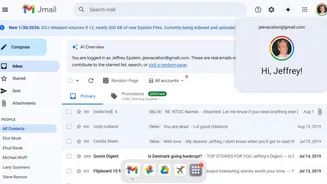









A new online tool called Jmail is changing how the public navigates the recently released Jeffrey Epstein email archive by presenting it in a Gmail-style
interface. Instead of forcing users to dig through scattered PDFs, scans, and text files, Jmail reorganises publicly released Epstein emails into a familiar inbox layout, making the material far easier to search, read, and analyse. Jmail was built using emails already released through court cases and official disclosures. The project does not add new or private material; it simply restructures existing public records. The tool was developed by Riley Walz, an internet artist, and Luke Igel, a software engineer and CEO of AI video editing firm Kino. Their goal was to remove the friction that made Epstein records difficult for journalists, researchers, and the general public to explore. The interface closely resembles Google’s Gmail, allowing users to scroll through conversations, open email threads, and search for names or keywords. Optical character recognition (OCR) and AI-based text conversion were used to turn poorly scanned documents into readable, searchable text. This redesign makes timelines, relationships, and patterns within the Epstein Files easier to follow without altering the underlying data.
Beyond Jmail, the broader Epstein Files portal also organises other released material into dedicated sections such as Jphotos (images released by the Department of Justice), JDrive (documents and files), JFlights (flight details of Epstein’s private jet), Jamazon (records of Epstein’s online purchases), and more. All of this material comes from publicly released documents that were previously difficult to navigate.
How to Use Jmail (Step-by-Step)
- Open the Jmail portal, which loads the Epstein email archive in a Gmail-like inbox view.
- Use the search bar to look up specific names, keywords, or terms across all released emails.
- Click on subject lines to open individual messages or entire conversation threads.
- Browse emails chronologically to follow timelines and correspondence flow.
- Use familiar inbox features like previews, folders, and highlights to flag notable emails.
By turning fragmented public records into an intuitive interface, Jmail demonstrates how design can dramatically improve access to large-scale disclosures. Instead of spending hours opening PDFs one by one, users can now explore Epstein’s released correspondence as if they were browsing a real email account.