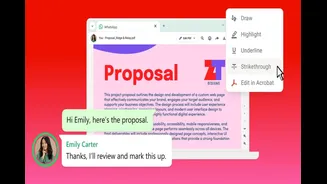









WhatsApp users can now open, review and mark up PDFs inside chats, with advanced editing and AI tools available through Adobe Acrobat.
WhatsApp has introduced Adobe Acrobat-powered PDF tools for users of
its Web and Windows apps. The integration allows users to open, read and add basic markups to PDF documents without downloading the file or leaving their WhatsApp conversation.
The feature is now available globally and is designed for everyday document-related tasks, including reviewing invoices, checking contracts, reading forms and sharing feedback. More advanced tools, such as PDF editing, electronic signatures and AI-generated summaries, require users to open the document in Acrobat.
PDFs Can Now Be Opened Inside WhatsApp Chats
When a PDF is shared through WhatsApp Web or the WhatsApp app for Windows, users can open it directly within the conversation. Documents can be viewed in full-screen mode, with controls for scrolling and zooming.
Adobe says Acrobat will handle the document preview, helping preserve the original formatting and page layout. Password-protected PDF files are also supported, although recipients will still need the correct password to access their contents.
WhatsApp says documents shared in personal conversations remain protected by its end-to-end encryption. This means the files and related messages should only be accessible to people participating in the chat.
Basic PDF Markup Tools Added
The integration includes lightweight markup tools for reviewing documents. Users can draw on a PDF, highlight or underline text and apply strikethrough formatting without moving to another application.
These controls may be useful when checking an agreement, marking changes in an assignment or drawing attention to information in an invoice. The annotated document can then be shared back into the conversation, keeping the original discussion and revised file in the same chat.
The built-in tools are intended mainly for reviewing and providing feedback rather than making extensive changes to a document.
Advanced Editing Opens in Adobe Acrobat
Users who need additional controls can select the “Edit in Acrobat” option. This provides access to tools for editing text, organising pages, adding signatures and applying password protection.
Adobe Acrobat AI Assistant can also summarise a PDF, answer questions about its contents and identify key information. Advanced editing and AI Assistant features require an eligible Acrobat subscription and may not be included with the free PDF tools available inside WhatsApp.
Availability and Supported Platforms
The Acrobat-powered experience is rolling out globally through WhatsApp Web and the Windows desktop app. WhatsApp has not announced the same integrated PDF tools for its Android, iPhone or Mac apps.
Users should ensure that their browser or WhatsApp Windows application is updated if the new controls do not appear immediately. Feature availability may also vary during the rollout.