


After the wave of Studio Ghibli-inspired portraits and mint-condition figurines, another AI makeover trend has taken over Instagram. This time, users are reimagining themselves in the glamorous 1980s—the
decade when colour television arrived in Indian homes and bold fashion ruled the screen.
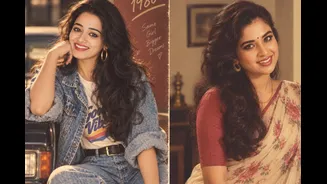
Instagram feeds are filling up with AI-generated portraits that look like stills from a vintage film or an old family photo album. Women are seeing themselves in vibrant sarees, softly curled hair, dramatic bangs and oversized earrings. Men are being transported to the era of loose tailored shirts, high-waisted trousers, thick moustaches and neatly styled hair.
What Is The ChatGPT ’80s Photo Trend?
The trend involves uploading a photograph to ChatGPT and asking it to recreate the person as though the picture had been taken during the 1980s.
Depending on the prompt, the result may resemble a Bollywood portrait, a formal studio photograph, a grainy film still or a vintage Indian magazine cover. Warm lighting, saturated colours, soft-focus effects and slightly faded textures help give the images their retro character.
Some users are opting for full cinematic makeovers, while others are keeping their facial features and expressions unchanged and modifying only the clothes, hairstyle and background.
How To Create Your Own ’80s-Inspired Photo
Creating the image does not require professional editing skills. Here is how to try the trend:
- Open ChatGPT and start a new conversation.
- Tap the plus icon and upload a clear photograph. A front-facing image with good lighting and an uncluttered background may produce a more convincing result.
- Describe the ’80s look you want, including the outfit, hairstyle, accessories, setting, lighting and image texture.
- Ask ChatGPT to maintain your facial features and natural skin tone while transforming the styling and surroundings.
- Review the generated photograph. If something does not look right, ask for specific changes instead of starting again.
Prompt For A Glamorous ’80s Bollywood Look
Upload your photograph and try this prompt:
“Transform this photo into a glamorous 1980s Indian film portrait. Preserve the person’s recognisable facial features and natural skin tone. Add voluminous, softly curled hair, a vibrant outfit, statement earrings, warm studio lighting, rich colours and the soft grain of an old film photograph. Keep the result realistic and elegant.”
Prompt For A Retro Male Portrait
“Reimagine this photograph as a stylish Indian portrait from the 1980s. Preserve the person’s face and natural skin tone. Add a relaxed tailored shirt, high-waisted trousers, neatly styled hair and a vintage watch. Use warm lighting, slightly faded colours and realistic film grain.”
Make The Result More Personal
A broad instruction such as “make this look like the 1980s” may produce a generic image. More detail can make the result feel intentional and distinctive.
Specify whether you want:
- A Bollywood-inspired studio portrait
- A middle-class Indian family album aesthetic
- A vintage wedding photograph
- A retro disco look
- An old magazine-cover shoot
- A grainy photograph taken on a film camera
- A ’70s-to-’80s saree and bouffant hairstyle
- A classic kurta, flared trousers or printed shirt
You can also mention a preferred colour palette, backdrop or mood. If the first result appears too modern, ask the tool to remove contemporary accessories, hairstyles and background elements.
Check Before Posting
AI-generated portraits may alter facial details, jewellery, fingers, clothing patterns or text in the background. Examine the image closely before sharing it on Instagram and avoid presenting it as a genuine archival photograph.
Users should also be careful when uploading personal images. Avoid photographs containing sensitive documents, private surroundings or people who have not consented to having their pictures transformed.