







The Golden Rule of Electronics Screening
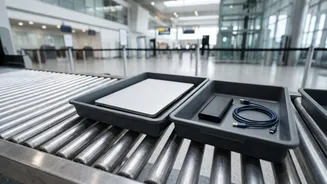
Frequent flyers know the drill: as you approach the X-ray scanner, all large personal electronic devices must be removed from your carry-on bag and placed in a separate tray. In India, the Bureau of Civil Aviation Security (BCAS), which sets the rules
for airport security, requires laptops, tablets, and other large gadgets to be screened individually. This isn't an arbitrary rule designed to slow you down; it's a critical security measure rooted in the technology of the scanners themselves. While some airports are upgrading to newer 3D scanners that may eventually eliminate this step, the vast majority still operate with systems that require this separation for a clear view.
Why Laptops Need Their Own Tray
The primary reason for removing laptops is their density. An X-ray scanner works by passing rays through your bag to create an image of its contents. However, the dense components of a laptop—particularly its battery, hard drive, and processors—can absorb these rays and appear as a large, dark, and impenetrable block on the security officer's screen. This solid mass can easily obscure other items packed in the bag, potentially concealing dangerous or prohibited objects from view. By scanning the laptop separately, security personnel can get an unobstructed image of its internal components and, just as importantly, see what else is in your bag.
The 'Pack on Top' Strategy Explained
This brings us to the simple yet effective strategy of packing your tech on top. When your laptop, tablet, and e-reader are buried at the bottom of your backpack, you're forced to stop at the security belt and unpack half of your belongings. This causes a delay, holding up not just you but the entire queue behind you. Packing your large electronics right on top, or in an easily accessible front pocket, transforms the process. You can swiftly retrieve them, place them in the tray, and send your bag through the scanner without a frantic search. It's an act of preparation that minimises friction and stress at a key pinch-point in the airport journey.
Avoiding the Dreaded Manual Bag Check
Failing to present your electronics clearly often results in a manual bag inspection, which is the single biggest time-waster at security. If the X-ray operator sees a cluttered, unreadable image, they are required to flag the bag for a physical search. An officer will have to take you aside, open your bag, and manually go through its contents to resolve the ambiguous image. This can be triggered by a laptop left inside, but also by a tangled mess of chargers and cables that can resemble something more sinister on a 2D scanner. A neatly packed bag with electronics placed on top for easy removal is far less likely to trigger this secondary screening, saving you precious time and a lot of hassle.
It’s Not Just Laptops Anymore
The rule doesn't just apply to your work laptop. Any electronic device larger than a standard smartphone should be treated similarly. This includes tablets, e-readers like a Kindle, portable gaming consoles, and even large cameras. It's also wise to organise your smaller accessories. Instead of having a chaotic web of cables, use a small pouch or organiser to keep your chargers, power banks, and adapters neatly bundled. This not only makes your bag tidier but also presents a cleaner, more legible image on the X-ray scanner, further reducing the chance of a manual check. Remember that in India, power banks and spare lithium batteries are strictly prohibited in checked baggage and must be carried in your cabin bag.