


Start with Your Setup
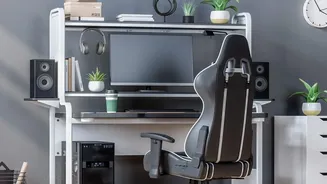
True comfort begins with ergonomics, which is simply about fitting your workspace to your body, not the other way around. Start with your chair. Adjust its height so your feet rest flat on the floor with your thighs parallel to the ground. Your elbows
should be bent at a comfortable 90-degree angle, close to your body. Next, position your monitor about an arm's length away, with the top of the screen at or just below eye level to prevent neck strain. If you're working on a laptop, a separate keyboard and mouse can be a game-changer, allowing you to position your screen and hands independently for a more natural posture.
Master Your Posture
Even the perfect chair can't save you from the habit of slouching. The goal isn't to hold one rigid position for hours but to be mindful of your alignment. Sit with your back supported by your chair, and try to keep your head aligned over your shoulders, avoiding the common forward-head position that strains neck muscles. A simple trick is to imagine a string pulling the top of your head toward the ceiling. When you feel yourself hunching, take a moment to reset: pull your shoulder blades down and back, and tuck your chin slightly as if giving yourself a gentle double chin. This simple reset can alleviate significant tension over time.
Give Your Eyes a Break
Staring at a screen for hours can lead to digital eye strain, causing symptoms like dryness, headaches, and blurred vision. The 20-20-20 rule is an effective way to combat this. The concept is simple: for every 20 minutes you spend looking at a screen, take a 20-second break to look at something at least 20 feet away. This allows the muscles in your eyes to relax. Set a timer on your phone or computer as a reminder. It’s also helpful to make a conscious effort to blink more often, as we tend to blink less when focused on a screen, which contributes to dry eyes.
Incorporate Movement
Our bodies are not designed for prolonged sitting. Taking regular breaks to move is crucial for both physical and mental health. Research shows that people who don't take regular breaks are more likely to develop musculoskeletal issues like back pain. Aim to get up at least once an hour. You don't need to do a full workout; a short walk to the kitchen for water, a few simple stretches, or even just standing up during a phone call can make a difference. Gentle neck rolls, shoulder shrugs, and spinal twists can be done right at your desk to relieve stiffness.
Stay Hydrated
Dehydration is a sneaky productivity killer. Even mild dehydration can impair cognitive function, reduce concentration, and cause fatigue and headaches. Your brain relies on proper hydration to function optimally. Keeping a water bottle on your desk serves as a visual reminder to drink throughout the day. Sipping water consistently not only helps maintain energy levels but also supports nearly every process in your body, from regulating temperature to delivering nutrients. If you feel a mid-afternoon slump coming on, try a glass of water before reaching for another coffee.
Schedule Mental Pauses
Breaks aren't just for your body; your brain needs them too. Constantly focusing on tasks can lead to mental fatigue and burnout. A true mental pause means stepping away from work-related stimulation. Scrolling through social media during a break might feel like resting, but it can often be just as overstimulating as work. Instead, try a few minutes of quiet. Look out a window, listen to a song, or practice a few deep breaths. These moments of 'not-doing' allow your brain to reset, helping you return to your tasks with renewed focus and creativity.