





The Golden Rule: Never Enter a PIN to Receive Money
This is the most important rule of UPI security. You only need to enter your UPI PIN when you are sending money, not when you are receiving it. Fraudsters often create a sense of urgency, telling you to approve a request or scan a QR code to receive a payment,
refund, or cashback prize. If you are asked to enter your PIN to get money, it is always a scam. Approving such a request will debit your account, not credit it. Always remember: to receive money, you only need to provide your UPI ID or phone number—no PIN, QR scan, or approval is required.
The QR Code Scam: Scan Only to Pay
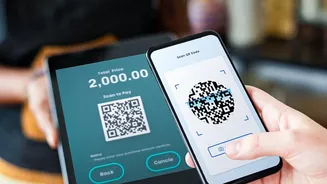
QR codes are for making payments, not for receiving them. Scammers exploit this by sending you a QR code and claiming you need to scan it to accept a payment. In reality, scanning that code and entering your PIN will send money from your account to theirs. This is a common trick used in online marketplaces where a fake buyer sends a QR code to a seller. Another tactic involves fraudsters placing a sticker with their malicious QR code over a genuine one at a shop. To stay safe, only use official UPI apps like Google Pay, PhonePe, or your bank's app to scan QR codes, as they have better security checks. Always double-check the recipient's name displayed on your screen after scanning before you enter your PIN.
The Fake Request Trap: Read Before You Approve
One of the most common UPI frauds involves the 'Collect Request' feature. Scammers will send you a payment request, often disguised with a message like “Enter your PIN to receive your refund of Rs 5,000.” Unsuspecting users who are expecting money might approve the request without reading it carefully, only to find that they have sent money instead. Always read the pop-up message on your UPI app carefully. It will clearly state whether you are paying money or receiving it. If you did not initiate the transaction, decline any unexpected payment requests immediately.
The Screen Sharing Deception: Your Screen Is Your Vault
Fraudsters may pose as customer service agents from a bank or payment app, offering to help you with a technical issue. They will then ask you to download a screen-sharing application like AnyDesk or TeamViewer, claiming it's needed to resolve the problem. Once you grant them access, they can see everything on your screen, including when you enter your UPI PIN or receive an OTP. They can then use this information to take over your account. Never grant screen-sharing access to anyone, especially someone who contacts you unexpectedly. Legitimate customer support will never ask for this.
The Impersonation Play: Verify Every Urgent Call
Scammers often create a sense of panic to make you act without thinking. They might call or message you pretending to be from your bank, the police, or a government agency, claiming your account is blocked or needs immediate KYC verification. They will then pressure you to share your PIN, OTP, or click a malicious link to “fix” the issue. No bank, financial institution, or government body will ever call you to ask for your UPI PIN or OTP. If you receive such a call, hang up. If you're concerned about your account, contact your bank through the official number listed on their website.
Smart Digital Habits: Your Best Defence
Beyond avoiding active scams, certain habits can significantly boost your security. Set a daily transaction limit on your UPI app to cap potential losses. Regularly review your transaction history for any unauthorized activity. Always download UPI and banking apps from official sources like the Google Play Store or Apple App Store, as fake apps can steal your data. Finally, keep your UPI app and your phone’s operating system updated, as these updates often contain critical security patches that protect you from new vulnerabilities.