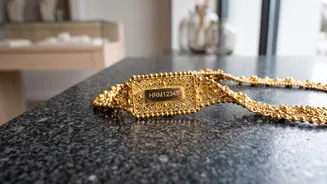







Buying gold in India is a cherished tradition and a significant investment. But how can you be certain of its purity? The Bureau of Indian Standards (BIS) offers a digital solution that puts the power of verification right in your hands.
Understanding the Hallmark and HUID
For decades, the
BIS hallmark has been a trusted symbol of purity for gold jewellery. To enhance transparency and prevent fraud, the government made hallmarking mandatory and introduced the Hallmark Unique Identification (HUID) number. This is a unique six-character alphanumeric code laser-engraved on every single piece of hallmarked jewellery, alongside the BIS logo and the purity grade (like 22K916). Think of the HUID as a unique digital fingerprint for your ornament, ensuring it can be traced from the testing centre directly to you. Since April 2023, all new hallmarked gold jewellery sold by registered jewellers must carry a HUID.
Introducing the BIS Care App
The BIS Care app is a free mobile application from the Bureau of Indian Standards, available on both Android and iOS. Its primary purpose is to allow consumers to check the authenticity of various certified products, with a key feature being the 'Verify HUID' function for gold jewellery. By using this tool, you can instantly access the official database record for your specific ornament, cutting through any verbal promises made at the counter and relying on certified data instead. The app also allows users to file complaints regarding substandard products or misuse of BIS marks.
A Step-by-Step Verification Guide
Verifying your gold's authenticity is a simple process that takes only a minute. First, download the official 'BIS Care' app from the Google Play Store or Apple App Store, being careful to choose the one published by BIS to avoid fake apps. After a simple one-time registration using your name and mobile number, open the app and select the 'Verify HUID' option on the home screen. Carefully locate the six-character code on your jewellery—it's often on an inner surface or near the clasp and may require a magnifying glass—and type it into the app. Once you hit search, the app will retrieve the official hallmarking details.
Decoding Your Verification Results
When you successfully verify a HUID, the app displays several crucial details. This includes the purity of the gold (both in karats and fineness), the type of article (e.g., ring, bangle), the date of hallmarking, and details of the jeweller who had it certified. You will also see information about the Assaying and Hallmarking Centre (AHC) that tested the piece. The most important step is to compare this information with the details on your purchase invoice. Ensure the purity, article type, and jeweller's registration details shown in the app match what you have been sold. Any discrepancy is a red flag that warrants an immediate conversation with the seller.
What If the Details Don't Match?
If the app shows 'record not found' or displays details that contradict your purchase, don't panic immediately. First, double-check that you have entered the six-character HUID correctly, as the tiny engravings can be easy to misread. You can also try the verification service on the BIS web portal (huid.manakonline.in), which uses the same database. If the details are still incorrect or missing, you should question the jeweller. If you are not satisfied with the explanation, the BIS Care app has a 'Complaints' feature that allows you to formally report the issue directly to the authorities, empowering you to take action against potential malpractices.