






The Unseen Strain of the Home Office
The shift to long hours in a home office has brought convenience, but it has also introduced a host of physical complaints, with neck and back pain leading the charge. Unlike a purpose-built office, home setups often involve repurposed dining tables or
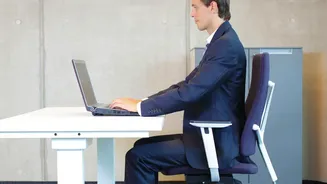
desks that aren't ergonomically sound. Many people place their laptop or monitor directly on the desk surface, forcing them to look down for hours. This seemingly small habit has a significant, cumulative effect on the body. Without conscious effort, you begin to slouch, your shoulders round forward, and your head drifts out of alignment with your spine. These gradual changes often happen without you noticing until the discomfort becomes chronic, leading to stiffness, persistent aches, and even headaches.
The Science of 'Tech Neck'
The term 'tech neck' refers to what medical professionals call forward head posture. Your head weighs approximately 10 to 12 pounds when your posture is neutral, with your ears aligned over your shoulders. In this position, your spine efficiently supports that weight. However, the physics change dramatically when you lean forward. For every inch your head moves forward, the effective weight on your cervical spine can increase by an additional 10 pounds. Research shows that a 15-degree forward tilt makes your head feel like 27 pounds, and at 60 degrees—a common angle for looking down at a laptop—the pressure is equivalent to carrying a 60-pound weight on your neck. This immense and sustained pressure overworks the muscles in your neck and upper back, which are constantly fighting gravity to hold your head up.
From Muscle Aches to Lasting Issues
What begins as muscle fatigue can escalate into more serious issues. Constant forward head posture can lead to a cascade of problems beyond simple soreness. Chronic tension in the neck and shoulder muscles can trigger frequent tension headaches. The sustained pressure on the vertebrae can lead to uneven wear on the spinal discs and joints, potentially accelerating degeneration. Furthermore, this poor posture can cause the chest muscles to tighten while the upper back muscles become weak and overstretched, an imbalance that leads to rounded shoulders and a hunched appearance. In some cases, this misalignment can even irritate nerves, causing tingling or numbness in the arms and hands.
The Golden Rule of Monitor Ergonomics
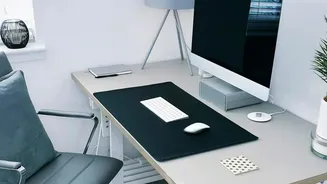
The solution is surprisingly simple and follows a golden rule: position your monitor so the top line of the screen is at or slightly below your horizontal eye level. When you are seated upright and look straight ahead, your gaze should naturally fall on the top third of the screen. This alignment allows you to view the entire display without needing to tilt your head up or, more commonly, crane your neck down. The monitor should also be positioned about an arm's length away, typically 20 to 30 inches, so you can see the whole screen without leaning in or straining your eyes. Achieving this may require placing a stack of sturdy books under your monitor base, investing in a dedicated monitor stand, or using an adjustable monitor arm. For laptop users, an external keyboard and mouse are essential to allow you to raise the laptop to eye level on a stand.
Creating a Fully Ergonomic Workspace
While monitor height is a critical component, true spinal relief comes from a holistic approach to your workspace. Ensure your chair provides adequate lumbar support to maintain the natural curve of your lower back. Your feet should be flat on the floor with your knees at roughly a 90-degree angle; use a footrest if needed. Your elbows should also form a 90-degree angle when your hands are on the keyboard, with your wrists in a straight, neutral position. Finally, remember that even the most perfect posture isn't meant to be held statically for eight hours. Incorporate regular movement by standing up, stretching, and walking around for a few minutes every hour to reduce muscle fatigue and pressure on your spine.