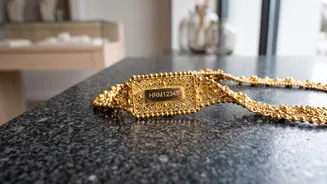







For generations, buying gold in India involved a leap of faith. Now, technology puts the power of verification directly into your hands, ensuring the purity of your precious investment before you even leave the store.
The Old Problem and the New Solution
Purchasing gold has always been more
than just a transaction; it's a cornerstone of financial security and tradition. However, the nagging fear of being sold under-karatage gold has always lingered. You might pay for 22-karat purity but receive something less, with no easy way to confirm it. To solve this, the Bureau of Indian Standards (BIS) made hallmarking mandatory and introduced a powerful digital layer: the Hallmark Unique Identification (HUID) number. This system has revolutionised consumer confidence by making the entire process transparent and traceable.
What is the HUID Number?
The HUID is a six-character alphanumeric code, like 'AZ4K19', that is laser-engraved onto every single piece of hallmarked jewellery at a government-certified Assaying and Hallmarking Centre (AHC). This code is completely unique to that one item. Even in a pair of earrings, each earring will have its own distinct HUID. This number acts as a digital fingerprint, linking the physical piece of jewellery to a secure record in the central BIS database. Before HUID, hallmarking certified a batch of items; now, it certifies each specific article.
Meet Your New Gold-Buying Tool: The BIS Care App
The BIS Care app is a free mobile application from the Bureau of Indian Standards, available for both Android and iOS devices. While the app has several functions related to product standards, its most powerful feature for jewellery buyers is 'Verify HUID'. This tool allows any consumer to instantly access the database record associated with a piece of jewellery, effectively turning your smartphone into a verification device. The app is designed to be user-friendly and is available in multiple languages, including English and Hindi.
How to Verify Your Jewellery in Seconds
Using the app is straightforward and best done right at the jeweller’s counter. First, download 'BIS Care' from the official app store and complete a simple registration. Ask the jeweller for a magnifying glass (loupe) to read the tiny inscription on the jewellery. You are looking for three marks: the triangular BIS logo, the purity grade (e.g., 22K916), and the six-character HUID. Open the app, select 'Verify HUID', and carefully enter the code. The app will then display the official record for that specific item.
What the Verification Results Mean
A successful verification will show crucial details about the item. This includes the purity (e.g., 22K916), the type of article (e.g., 'ring' or 'bangle'), the name of the jeweller who submitted it for hallmarking, and the AHC that tested it. Cross-check this information with the physical item in your hand and the details on the bill. A mismatch—for example, if the app says 'ring' but you are holding a necklace—is a major red flag. If the app returns a 'Record Not Found' message, the HUID is not in the official database, and you should not purchase the item.
What to Do If Details Don't Match
If you find a discrepancy or a fake HUID, the BIS Care app has a built-in 'Complaints' section. You can file a formal complaint directly against the jeweller or report misuse of the hallmark. It is crucial to have a proper bill or invoice that clearly lists the HUID, weight, and purity of each item, as this serves as your primary evidence. Consumers can report issues such as mismatched details, substandard quality, or even an absent hallmark on an item sold as certified. The BIS investigates these complaints to ensure accountability in the market.