






The Two-Second Habit: Always Verify the Name
The single most effective habit for UPI safety takes only two seconds: always verify the recipient's name on the screen before you enter your PIN. [4, 10, 17, 23] When you enter a UPI ID or phone number, your UPI app shows the registered name of the account
holder. [17] This is your final checkpoint. Scammers often use UPI IDs that look similar to legitimate ones, or you might simply mistype a phone number. Taking a moment to read and confirm the name on the payment confirmation screen ensures your money is going to the intended person or business. [5, 23] The National Payments Corporation of India (NPCI) explicitly advises users to always check the beneficiary name before finalising a payment. [17, 23] Making this quick check a non-negotiable part of your payment process can save you from irreversible mistakes and financial loss. [10]
Know What Your PIN Is For (And What It’s Not For)
The golden rule of UPI is simple: you only need to enter your PIN to *send* money, never to *receive* it. [8, 16] Fraudsters thrive on creating confusion around this fact. One of the most common scams is the 'collect request' fraud. [11] A scammer will send you a payment request, often disguised as a refund or prize money, and urge you to enter your PIN to accept the funds. [8, 11] Approving a collect request and entering your PIN is the same as authorising a payment *from* your account. [13] Legitimate institutions and individuals will never ask for your PIN to credit your account. [3, 16] If you get a request to enter your PIN to receive money, it is always a scam. [8, 11]
Beware of Common Scams
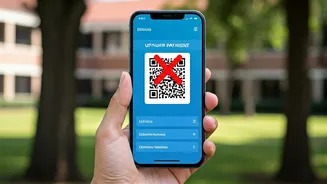
Beyond the collect request trick, fraudsters employ several other tactics. Phishing scams, for instance, use fake links sent via SMS or email that lead to counterfeit websites designed to steal your PIN or other credentials. [5, 7] Another prevalent method is QR code fraud, where a scammer provides a QR code that, when scanned, initiates a payment *from* your account instead of enabling you to receive money. [2, 7] Remember, you only scan a QR code to pay someone; you never need to scan one to get paid. [5, 17] Scammers also impersonate bank representatives or customer service executives to trick you into revealing your PIN or One-Time Passwords (OTPs) over the phone. [3, 5] No legitimate bank or UPI app will ever call you to ask for these details. [5]
Strengthen Your Overall Security
Adopting a few other habits can further fortify your defences. First, secure your device itself with a strong password or biometric lock. [4, 19] Inside your UPI app, enable multi-factor authentication if available. [6] Be wary of making transactions on public Wi-Fi networks, which are more vulnerable to interception; use your mobile data instead. [3, 4] Only download UPI apps from official sources like the Google Play Store or Apple App Store to avoid malicious fake applications. [3, 12] You should also consider setting a daily transaction limit on your UPI app to cap potential losses. [4, 12] Regularly check your transaction history for any suspicious activity. [4, 19] Enabled transaction alerts via SMS and email are crucial for spotting unauthorised payments immediately. [23]
What to Do If You've Been Scammed
If you suspect you've fallen victim to fraud, time is critical. The first step is to immediately report the fraudulent transaction to your bank to try and block the transfer. [2] Next, call the National Cybercrime Helpline at 1930. [2] This can help trigger a quick freeze on the fraudster's account. You must also file a formal complaint on the National Cybercrime Reporting Portal at www.cybercrime.gov.in. [2] Finally, raise a dispute within your UPI app and change your PIN immediately to prevent any further unauthorised transactions. [14]