




The Surprising Link Between Your Screen and Spine
It may seem disconnected, but the position of your monitor directly impacts your entire spinal alignment. When your screen is too low, you naturally tilt your head and crane your neck forward to see it. This posture, often called 'tech neck', does more
than just strain your neck muscles. The forward pull of your head, which weighs a surprising amount, forces your upper back to round and your shoulders to slump. To compensate for this upper-body imbalance, your lower spine can curve excessively, placing sustained pressure on the muscles and discs of your lower back. Over many hours a day, this subtle misalignment can contribute to chronic stiffness, muscle fatigue, and persistent lower back pain. Correcting your monitor height is one of the simplest yet most effective ergonomic changes you can make to encourage a neutral, supported posture throughout the workday.
How to Find Your Perfect Monitor Height
Finding the right height is a quick process that sets the foundation for a healthier workstation. First, sit back in your chair in your normal working posture. Your feet should be flat on the floor, your back supported by the chair, and your shoulders relaxed. With your head comfortably upright, looking straight ahead, close your eyes. When you open them, your natural line of sight should land on the top third of your monitor. A widely accepted rule of thumb is that the very top edge of the screen should be at or just slightly below your eye level. If you have to tilt your chin up, the monitor is too high. If you find yourself hunching forward or looking down significantly, it's too low. This position allows your neck to remain in a neutral, relaxed state, preventing the cascade of postural problems that lead to back strain.
Simple and Affordable Ways to Raise Your Screen
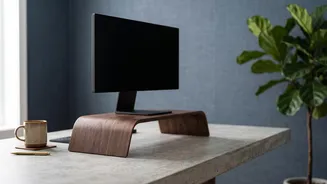
You don't need expensive equipment to achieve the correct monitor height. Many effective solutions are likely already within reach. The simplest method is to use a sturdy, flat object as a riser. A stack of thick books, a ream of printer paper, or a small, stable box can work perfectly. For a more permanent and adjustable solution, consider a dedicated monitor stand or riser. These products are designed to lift your screen to various heights and often provide extra desk space underneath for storage. If you want maximum flexibility, a fully articulated monitor arm is an excellent investment. These arms clamp to the back of your desk and allow you to easily adjust the height, distance, and angle of your screen with just a light touch, making it easy to achieve the perfect ergonomic position.
It's Not Just Height: Distance and Angle Matter Too
Proper ergonomics go beyond just the vertical position of your screen. The distance and angle are also crucial for comfort and preventing strain. As a general rule, your monitor should be about an arm's length away from you. Sit back and extend your arm; your fingertips should just about touch the screen. If you have to lean forward or squint to read the text, you should increase the font size on your computer rather than moving the monitor closer. Additionally, the screen itself should not be perfectly vertical. Tilting the top of the monitor back by about 10 to 20 degrees can reduce glare and better align with your natural downward gaze, further reducing neck strain. If you wear bifocals, you may need to position the monitor slightly lower and with a more pronounced backward tilt to avoid tilting your head back to see through the correct part of your lenses.
Complete Your Ergonomic Setup
While monitor position is a critical piece of the puzzle, it works best as part of a complete ergonomic setup. Ensure your chair supports your lower back's natural curve; use a small cushion if needed. Your elbows should be bent at roughly a 90-degree angle, with your wrists in a neutral, straight position while typing. Your knees should also be at about a 90-degree angle, with your feet resting flat on the floor or on a footrest if they don't reach. Finally, remember to take frequent breaks. Stand up, stretch, and walk around for a few minutes every hour to relieve muscle tension and give your eyes a rest from the screen. These combined adjustments will work together to create a workspace that supports your body and significantly reduces the risk of pain and strain.