






The Foundation: A Well-Structured Outline
The magic of modern presentation tools starts with a simple, yet crucial, element: your text outline. Think of AI as an incredibly fast designer, but it needs clear instructions. Before you even think about tools, structure your notes logically. Use a clear hierarchy
with a main title, slide titles, and bullet points for supporting details. A good outline clearly defines your topic, identifies the key points for each slide, and arranges them in a sequence that tells a story. This process forces you to clarify your message upfront. Instead of getting lost in design choices, you focus on the narrative, ensuring your final presentation is not just pretty, but also coherent and persuasive.
Choosing Your AI-Powered Assistant
A new generation of AI presentation makers has revolutionised the workflow. Tools like Gamma, Tome, and Beautiful.ai are built specifically to turn text prompts or outlines into fully designed presentations. Similarly, familiar platforms now have powerful AI integrated within them. Microsoft Copilot can create a complete presentation from a Word document directly inside PowerPoint. Google Workspace users can use Gemini to generate slides from scratch or based on documents in their Drive. These tools don't just paste your text onto a template; they analyze your content's structure to suggest layouts, visuals, and even speaker notes, saving hours of manual work.
The Generation Process: From Text to Deck
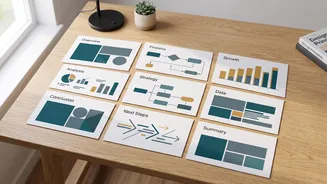
Once you have your outline and have chosen a tool, the process is remarkably simple. Typically, you'll start by providing the AI with your content. This can be as straightforward as pasting your text outline, uploading a document, or writing a detailed prompt describing your topic, audience, and desired length. The AI then gets to work, interpreting your input, structuring the information into slide-sized chunks, and applying a consistent design. Within moments, you'll have a first draft of your entire slide deck. Most tools will generate an outline for your review first, allowing you to make structural changes before the full slides are created.
The Human Touch: Refining Your AI Draft
An AI-generated deck is a powerful starting point, not a finished product. The biggest mistake is treating the first draft as final. Now is the time for human refinement. First, review the text. AI can sometimes generate wordy or generic content, so edit for clarity and trim unnecessary bullet points. Aim for one main idea per slide to keep your audience engaged. Next, scrutinize the visuals. Replace generic AI-generated images with more relevant photos, charts, or personal examples. Finally, check for consistency in design elements like fonts and colors, ensuring the entire presentation feels cohesive. This editing pass is what elevates a decent AI draft into a polished, professional presentation.
Beyond the Basics: Speaker Notes and Rhythm
Effortless slide creation frees you up to focus on what truly matters: your delivery. Many AI tools can also generate speaker notes for each slide, giving you a script to practice with and adapt. This feature is perfect for building confidence and ensuring you don’t just read off the slides. As you refine the deck, think about its visual rhythm. A common pitfall of AI-generated slides is that they can look monotonous. Vary your layouts; not every slide needs to be a title with three bullet points. Use slides with just a powerful image, a single data point, or a compelling quote to break up the pace and keep your audience focused on your message.