






The Problem with Poor Posture
Working from the sofa or a kitchen stool might feel comfortable for an hour, but over days and weeks, it takes a toll. Poor posture from slouching, hunching, or craning your neck puts excessive strain on your spine’s natural curves. This constant stress
can lead to muscle fatigue, stiffness, compressed spinal discs, and chronic pain. An environment not designed for your body forces you to compensate in ways that can damage spinal structures over time. Ergonomics is the science of fitting your workspace to your body, not forcing your body to fit your workspace, which is crucial for preventing these long-term issues.
Your Chair: The Foundation of Support
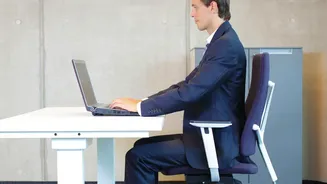
Your chair is the single most important ergonomic investment. An ideal chair provides adjustable lumbar support to maintain the natural inward curve of your lower back. Your feet should rest flat on the floor with your knees at roughly a 90-degree angle, aligning with your hips. If an expensive ergonomic chair isn't an option, you can still make improvements. Use a rolled-up towel or a small cushion for lumbar support on your existing chair. The goal is to ensure your buttocks are pressed against the back of the chair, providing continuous support and reducing strain.
Screen Height and 'Tech Neck'
The phenomenon known as “tech neck” results from constantly looking down at screens, which puts immense strain on your neck and upper back. For every inch your head moves forward, its effective weight on your spine increases significantly. To combat this, position your monitor so the top of the screen is at or slightly below eye level. This encourages a neutral neck position. If you use a laptop, this is almost impossible without help. Use a laptop stand or a stack of books to elevate the screen and use a separate keyboard and mouse to maintain proper arm and wrist posture.
Desk, Keyboard, and Mouse Placement
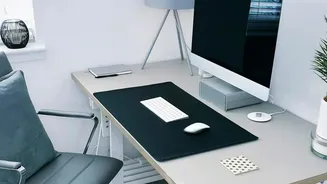
Your desk setup should allow your arms to rest comfortably. When typing, your elbows should be at about a 90-degree angle with your wrists in a neutral, straight position. Position your keyboard and mouse close enough that you don't have to reach, which can cause shoulder and neck strain. If your desk is too high and not adjustable, raise your chair and use a footrest to keep your feet supported. A simple stack of textbooks or a binder can work in a pinch. This complete setup prevents the muscle imbalances that arise from awkward reaching and poor wrist angles.
The Power of Regular Movement
Even the most perfectly ergonomic setup can be undermined by staying in one position for too long. Prolonged sitting slows circulation and causes muscles to stiffen. Experts recommend taking short breaks to stand, stretch, and walk around every 30 to 45 minutes. These micro-breaks don't have to be long; simply standing up, rolling your shoulders, or gently stretching your neck can boost blood flow, reduce muscle tension, and realign your posture. Set a timer to remind yourself to get up. Movement is a crucial, non-negotiable part of a healthy work routine.