

Start with Your Chair Height
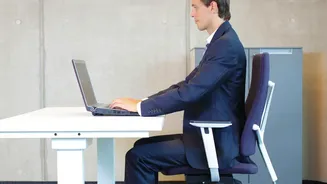
The foundation of a pain-free setup begins with your feet. Adjust your chair's height so that your feet are resting flat on the floor. Your thighs should be parallel to the ground, with your knees bent at approximately a 90-degree angle. If your feet are dangling,
your pelvis can tilt backward, putting a strain on your lower back. If your chair doesn't go low enough, use a footrest or a stack of sturdy books to bring the floor up to you. Conversely, if your desk is too high, raise your chair and use a footrest to achieve this foundational posture.
Dial-In Lumbar and Seat Support
A common cause of back pain is sitting without proper spinal support. Your chair should support the natural curve of your lower back. Sit all the way back in your seat so your spine is flush against the backrest. If your chair lacks built-in lumbar support, place a small pillow or a rolled-up towel in the curve of your lower back. The seat depth is also crucial; you should have about two to three fingers' width of space between the edge of the seat and the back of your knees. This prevents the seat from cutting off circulation or pressing on nerves.
Position Your Armrests Correctly
Armrests are not just for resting; they play a key role in reducing shoulder and neck tension. Adjust them so your elbows can rest comfortably at a 90-degree angle, allowing your shoulders to relax. Your arms should gently rest on them while typing. If your armrests are too high, it will force you to shrug your shoulders, leading to tension. If they are too low, you might lean to one side. Proper armrest height helps keep your upper body aligned and stable.
Set Your Monitor Height and Distance
Your monitor's position dictates your neck and head posture. To prevent craning your neck forward or looking down, position the top of your monitor screen at or slightly below your eye level. This allows your gaze to fall naturally toward the middle of the screen. The monitor should be about an arm's length away from you—typically between 20 and 40 inches. If you find yourself leaning forward or squinting, your monitor is likely too far away. Using stacked books or a dedicated monitor stand can help you achieve the perfect height.
Centre Your Screen and Consider the Angle
The monitor should be placed directly in front of you, centered behind your keyboard, to avoid twisting your neck. If you use multiple monitors, position your primary screen directly in front and the secondary one to the side, angled slightly inward. Turn your whole chair to face the secondary monitor rather than just twisting your neck. You can also tilt the monitor slightly upward to reduce glare and ensure a comfortable viewing angle, which helps keep your neck relaxed.
Don't Forget to Move
Even the most perfect ergonomic setup cannot counteract the negative effects of sitting in one position for too long. Prolonged sitting can lead to tight muscles and reduced circulation. Set a reminder to get up, stretch, and walk around for a few minutes every 30 to 60 minutes. Simple actions like standing up during a phone call, doing a few backbends, or walking to the kitchen for water can make a significant difference in preventing stiffness and pain. Motion is a crucial part of the ergonomic equation.