





The Core Misunderstanding Scammers Exploit
The entire scam hinges on a simple but critical misunderstanding about how UPI works. Here is the golden rule you must never forget: You only scan a QR code or enter your UPI PIN when you want to send money. You never, under any circumstances, need to scan a code or enter your PIN to receive
money. Scammers know that many people are not aware of this distinction. They exploit this knowledge gap through social engineering, creating convincing stories to trick you into authorising a payment you believe is an incoming credit.
How the QR Code Scam Actually Unfolds
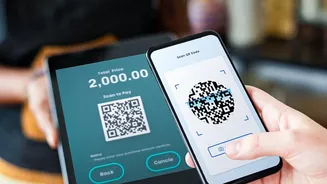
A fake QR code itself does not automatically steal your money. The theft requires your active participation, which scammers are experts at engineering. Typically, the scam starts when you are expecting money. This could be because you're selling a second-hand item online, expecting a refund from a company, or have been promised a cashback offer. The fraudster, posing as the buyer or a customer service agent, will send you a QR code via WhatsApp or another messaging app. They’ll instruct you to scan it using your UPI app to receive the payment. When you scan their code, your UPI app will display a payment screen, showing the scammer's details and an amount. It will ask for your PIN to authorise the transaction. The scammer will often create a sense of urgency, telling you to act fast before the 'offer' or 'payment link' expires. If you are rushed or distracted and enter your UPI PIN, you are not receiving money—you are sending it directly to the scammer's account.
Common Scenarios and Red Flags to Watch For
Awareness of the scammer's playbook is your best defence. Watch out for these common red flags:1. The 'Receive Money' Request: The biggest red flag is anyone asking you to scan a QR code to receive money. This is always a scam.2. Online Marketplace Fraud: Be extra cautious when selling items on platforms like OLX or Facebook Marketplace. Fraudsters frequently pose as buyers, agree to the price quickly, and insist on paying via a QR code they send you.3. Physical QR Code Tampering: At shops, petrol pumps, or parking areas, always check the QR code stand. Scammers sometimes paste their own QR sticker over the merchant's legitimate one. Before paying, confirm that the merchant name displayed in your UPI app matches the actual shop.4. Pressure and Urgency: Scammers often rush you, claiming a deal will expire or a refund will be cancelled if you don't act immediately. This is a tactic to prevent you from thinking clearly and noticing the payment details on your screen.5. Fake 'Collect Requests': Some scammers use the 'Request Money' feature. They send a request where the note might say "Refund Processed," but the button you need to press says "Pay." Always read the button, not just the note.
Your Action Plan for UPI Safety
Protecting yourself is straightforward if you follow a few basic principles. Make these habits part of every UPI transaction:Remember the Golden Rule: Never enter your UPI PIN to receive money. Period. Incoming transactions are automatic and require no action or authentication from you.Verify, Then Pay: Always double-check the name of the recipient and the amount on the confirmation screen of your UPI app before entering your PIN.Reject Unsolicited Requests: If you receive a QR code or a payment request from an unknown person, decline it. Be wary of anyone you don't know sending you a code.Use UPI ID for Receiving Payments: When someone needs to pay you, the safest method is to give them your UPI ID or your UPI-linked mobile number. This eliminates the need for any QR code scanning on your part.
What to Do If You Have Been Scammed
If you realise you have made a payment to a scammer, time is of the essence. Acting quickly can increase the chances of getting the transaction frozen. Take these steps immediately:1. Call the National Cyber Crime Helpline: Dial 1930 without delay. This is the government's dedicated helpline for reporting financial cyber fraud.2. Report on the Official Portal: File a formal complaint on the National Cyber Crime Reporting Portal at www.cybercrime.gov.in. Provide all details of the transaction, including the scammer's UPI ID or phone number and screenshots.3. Inform Your Bank: Contact your bank's customer service and report the fraudulent transaction. They may be able to provide further guidance or block the transaction if caught early enough.