






Why Sitting Can Strain Your Spine
Sitting for long periods, especially with poor posture, places significant stress on your spine. Slouching or hunching forward can increase pressure on the intervertebral discs, the cushions between your vertebrae. Over time, this constant load can contribute
to disc compression, muscle stiffness, and chronic pain. An improperly adjusted chair forces your body into awkward positions, straining the muscles in your back, neck, and shoulders as they work overtime to keep you upright. The good news is that creating a supportive environment starts with a few intentional adjustments to the most important tool in your home office: your chair.
The Foundation: Setting Your Seat Height
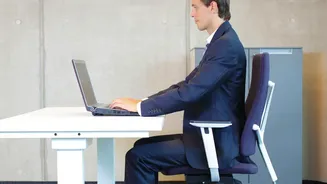
Everything starts from the ground up. The first and most crucial adjustment is your chair's height. The goal is to have your feet resting flat on the floor, not dangling or tucked underneath you. Adjust the seat until your knees are bent at approximately a 90-degree angle, with your thighs roughly parallel to the floor or angled slightly downward. Your hips should be level with or slightly higher than your knees. If your desk is high and you've raised your chair to compensate, use a footrest or a sturdy stack of books to ensure your feet have a solid foundation. This position provides a stable base for your entire posture and promotes healthy circulation.
Spinal Alignment: Mastering the Backrest and Lumbar Support
Your chair's backrest is not just for leaning back during breaks; it's an essential tool for active support. Sit so that your lower back is pressed firmly against the backrest, avoiding the tendency to perch on the edge of your seat. The most critical feature here is the lumbar support, designed to fill the natural inward curve of your lower back. Adjust the lumbar support's height so it fits perfectly into the small of your back. If it's too high, it can push your upper back forward; too low, and it fails to provide support, leading to slouching. The support should feel gentle and natural, not like a hard push. If your chair lacks built-in support, a rolled-up towel or a dedicated lumbar pillow can be an effective substitute.
Seat Depth: Giving Your Legs Room
An often-overlooked adjustment is the seat depth, which is the distance from the front edge of the seat to the backrest. If the seat is too long, it can press against the back of your knees, impeding blood flow and encouraging you to slide forward, negating your back support. To set it correctly, sit all the way back in your chair. Adjust the seat pan until you can fit two or three fingers between the front edge of the seat and the back of your knees. This ensures your thighs are supported while allowing for proper circulation and movement.
Shoulder and Neck Relief: Positioning Your Armrests
Armrests play a key role in reducing strain on your shoulders and neck. If they are too high, they will force your shoulders to shrug; if they're too low, you may lean to one side to rest an arm, creating tension along your spine. The ideal height is when your arms can rest gently with your elbows bent at a 90-degree angle and your shoulders completely relaxed. Your armrests should be just high enough to make light contact with your elbows, supporting your arms without propping them up. This simple adjustment helps prevent the unconscious hunching that contributes to upper back and neck pain.
Beyond the Chair: The Importance of Movement
Even the most perfectly adjusted ergonomic chair cannot eliminate the risks of a sedentary workday. Your body is designed to move. Ergonomic experts recommend taking a break from sitting every 20 to 30 minutes. You don't need a long workout; simply standing up, stretching, or walking around for a minute or two is enough to increase blood flow, reset your posture, and give your muscles a much-needed break from static loading. Consider setting a timer to remind yourself to move. This habit, combined with a properly configured chair, is your strongest defense against developing chronic pain.