




Start with Your Chair
Your chair is the foundation of a pain-free workday. The goal is to maintain the natural curve of your lower spine. Adjust your seat height so your feet rest flat on the floor, with your knees bent at roughly a 90-degree angle and level with your hips.
Sit all the way back in the chair so your lower back is fully supported by the backrest. If your chair lacks built-in lumbar support, place a small cushion or a rolled-up towel in the small of your back to maintain that essential curve. If the chair has armrests, adjust them so your elbows are bent at a 90-degree angle and your shoulders are relaxed, not hunched.
Position Your Screen at Eye Level
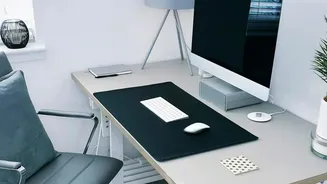
Hunching forward to see your screen is a primary cause of neck and upper back strain, which can cascade down to your lower back. Position your monitor directly in front of you, about an arm's length away. The top edge of the screen should be at or slightly below your eye level. This allows you to look straight ahead without tilting your head up or down. If you work on a laptop, this is nearly impossible without help. Use a laptop stand or a stack of books to raise the screen to the correct height, and use a separate keyboard and mouse.
Arrange Your Keyboard and Mouse
Reaching for your keyboard or mouse can cause shoulder and wrist strain. Place your keyboard and mouse at elbow height. When you type, your wrists should be in a neutral, straight position, not bent up, down, or to the side. Your forearms should be roughly parallel to the floor. Keep the mouse close to the keyboard to avoid overreaching, which can twist your torso and strain your back over time. Your elbows should stay close to your body while you work.
Check Your Feet and Legs
What your legs are doing has a direct impact on your lower back. Your feet should be flat on the floor to provide a stable base. If your chair is adjusted correctly for your desk height but your feet are dangling, use a footrest or a sturdy box. Avoid crossing your legs or tucking them under your chair for long periods, as this can twist your pelvis and strain your lumbar spine. There should be a small gap—about two to three fingers' width—between the front edge of the seat and the back of your knees to ensure good circulation.
Movement Is Your Best Friend
Even the most perfect ergonomic setup cannot protect you from the negative effects of static posture. Sitting for prolonged periods is hard on your body, so the most crucial adjustment you can make is to move regularly. Set a reminder to get up, stretch, and walk around for a few minutes at least once every hour. Simple stretches, like bending backward to counteract the forward slouch of sitting, can provide immense relief. If you have a sit-stand desk, try to alternate between sitting and standing, aiming for about 40 minutes of standing for every hour or two of sitting.