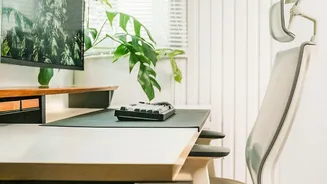







Your Body Sends Signals—Listen to Them
Before you adjust a single thing, take a moment to notice how you feel. Is your neck strained? Are your wrists sore? Do your eyes feel tired? These feelings are data. An ergonomic setup is not about achieving a single, perfect posture, but about creating
an environment that minimises strain on your body. The goal is to find a neutral position where your muscles and joints are not overworked. Pain is your body’s way of telling you that your current setup is forcing it into an awkward position. Forcing yourself to “sit up straight” in a poorly configured workspace can be just as harmful as slouching. The real solution is to adjust your environment to fit your body, not the other way around.
The Foundation: Your Chair and Seated Posture
Everything starts with your chair. Your feet should rest flat on the floor with your knees at or slightly below your hips, forming an angle of about 90 degrees. If your feet don't reach, use a footrest. There should be a small gap—about two to three fingers wide—between the front edge of the seat and the back of your knees to ensure good circulation. Most importantly, your lower back should be supported. Your chair should have lumbar support that fits the natural curve of your spine, preventing you from slumping forward as you tire. Your arms should also be relaxed, with armrests set at a height that allows your shoulders to remain down and not hunched.
Eye Level is Key: Monitor Placement
Hunching forward to see your screen is a primary cause of neck and shoulder pain. To fix this, position your monitor directly in front of you, about an arm's length away. The top of the screen should be at or just slightly below your eye level. This allows you to maintain a neutral neck position with a slight downward gaze of about 15 to 20 degrees. If you work on a laptop, this is almost impossible to achieve without help. Prop your laptop on a stand or a stack of books to raise the screen and use a separate, external keyboard and mouse.
Within Reach: Keyboard and Mouse Position
Your keyboard and mouse should be positioned to keep your wrists straight and your elbows close to your body. When you type, your elbows should be bent at a roughly 90-degree angle, with your forearms parallel to the floor. Avoid reaching for your mouse; it should be right next to your keyboard on the same level. Bending your wrists up, down, or sideways for extended periods can lead to repetitive strain injuries. Keeping your keyboard and mouse close allows your shoulders to relax and prevents you from twisting or extending your arm unnecessarily.
The Best Posture Is Your Next Posture
Even the most perfect ergonomic setup has a flaw: it encourages you to stay still. Prolonged, static posture is not good for your body. The most crucial element of a healthy desk routine is movement. Aim to get up, stretch, and walk around for a few minutes at least once every hour. These small breaks improve blood circulation, reduce muscle fatigue, and can even boost your focus and productivity. For your eyes, follow the 20-20-20 rule: every 20 minutes, look at something 20 feet away for 20 seconds to reduce eye strain. Movement is what keeps your joints and muscles flexible and resilient.