



Start From the Ground Up: Your Feet
The foundation of good posture begins with your feet. Before touching any other lever, adjust your chair's height so that your feet rest flat and firm on the floor. Your thighs should be parallel to the ground, or your hips can be slightly higher than
your knees. If your feet are dangling, even slightly, your pelvis can tilt backward, putting unnecessary strain on your lumbar spine. For those with shorter legs or a desk that's too high, a footrest is an essential tool to bridge the gap and provide a stable base. The goal is to ensure your weight is evenly distributed through your legs, not concentrated on your lower back.
Align Your Knees and Hips
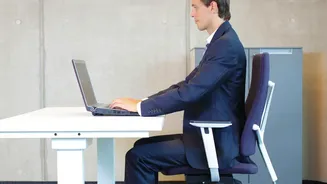
Once your feet are planted, focus on the angle of your knees and hips. The widely accepted ergonomic standard is the 90-degree rule. Your knees should be bent at approximately a 90-degree angle, and the angle between your torso and thighs should also be around 90 degrees. This position helps maintain a neutral spine. You should also ensure there's a small gap, about two to three fingers' width, between the front edge of the seat and the back of your knees. This prevents the seat from cutting off circulation. If your chair is too deep, you might need to add a lumbar cushion to push you forward or adjust the seat pan if your chair has that feature.
Position Your Arms and Elbows
Your chair height doesn't exist in a vacuum; it directly relates to your desk. With your shoulders relaxed, your elbows should also form a 90- to 100-degree angle, with your forearms resting parallel to the desk surface. Adjust your chair height up or down until the underside of your elbows is level with your desk or keyboard. If your armrests are adjustable, bring them to a height where they gently support your elbows without causing your shoulders to hunch up. If the armrests are too high, they create neck and shoulder tension; if they're too low, you might lean to one side, straining your back. The armrests should be close enough to your body to support your arms comfortably at your sides.
Engage Your Lumbar Support
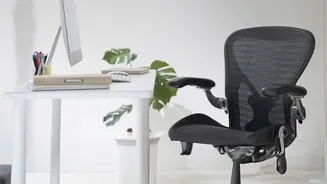
Proper back support is crucial for preventing slouching. Make sure you are sitting all the way back in your chair, so your buttocks and lower back are pressed against the backrest. This allows the chair to do the work of holding you upright. Most ergonomic chairs have an adjustable lumbar support cushion. This should be positioned to fit snugly into the natural curve of your lower back, which is typically just above your belt line. The support should feel firm but not like it's pushing you forward aggressively. If your chair lacks built-in adjustable support, a rolled-up towel or a dedicated lumbar pillow can serve the same purpose, filling the gap and preventing your spine from forming a 'C' shape.
Connect to Your Monitor and Workspace
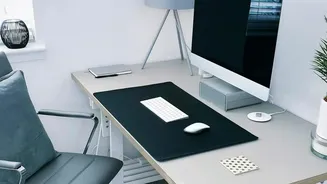
Finally, your chair height influences how you view your monitor. After setting your chair according to the principles above, check your screen position. The top of your computer screen should be at or slightly below your eye level. This ensures you can look forward with a neutral neck position, rather than hunching down or craning your neck up. If your monitor is too low after adjusting your chair, place it on a stand or a stack of books. Remember that the best posture is your next posture; even in a perfectly adjusted chair, it's important to move. Take short breaks every 20-30 minutes to stand, stretch, and walk around to keep your muscles active and reduce fatigue.