







Fine-Tune Your Physical Setup
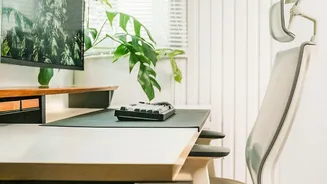
While the chair is just one piece of the puzzle, your physical setup is the foundation. Ergonomics extends to your entire desk. The top of your monitor should be at or slightly below eye level, about an arm's length away, to prevent neck strain. Your
keyboard and mouse should be positioned so your elbows are bent at a roughly 90-degree angle, with wrists in a neutral, straight position. If your feet don't rest flat on the floor, use a footrest or even a stack of old books. This alignment prevents a cascade of issues, from back pain to wrist discomfort.
Let There Be (the Right) Light
The light you work in has a profound impact on your energy and focus. Natural light is the undisputed champion, linked to better mood, higher productivity, and even better sleep. If possible, position your desk to maximize daylight, ideally with the window to your side to avoid glare. If you rely on artificial light, opt for warmer tones over harsh, cool fluorescents, which can cause eye strain and headaches. Equally important is your screen brightness; it should roughly match the ambient light in your room. Drastically different brightness levels force your eyes to work harder.
Breathe Easy, Work Better
We often overlook the air we breathe, but it's a critical component of a comfortable workspace. Poor ventilation can lead to a buildup of indoor pollutants, causing stuffiness and impacting cognitive function. A study from the Harvard T.H. Chan School of Public Health found that workers in well-ventilated offices had significantly higher cognitive scores. If you can, open a window to allow for fresh air circulation. Even a small air purifier can make a difference in air quality, while maintaining a comfortable temperature helps you stay focused instead of feeling too hot or cold.
Manage Your Soundscape
Noise is one of the biggest drains on productivity and mental energy in a modern office or home. Constant chatter, notifications, or background clamor can elevate stress levels. The solution isn't necessarily total silence. For some, a moderate level of ambient sound or soft music can improve creative thinking. The key is control. Noise-cancelling headphones are an invaluable tool for blocking out distractions and creating your own bubble of focus. Experiment with ambient sound apps or curated playlists to find what helps you concentrate without being a distraction itself.
Combat Digital Fatigue
Hours of screen time lead to Computer Vision Syndrome, also known as digital eye strain, with symptoms like dry eyes, headaches, and blurred vision. To combat this, follow the 20-20-20 rule: every 20 minutes, look at something 20 feet away for at least 20 seconds. This simple practice gives your eye muscles a much-needed break. Also, remember to blink. We tend to blink up to 60% less when staring at a screen, which leads to dryness. Using your device's dark mode, increasing text size for readability, and keeping lubricating eye drops handy can also provide significant relief.
The Power of Micro-Breaks
Perhaps the most crucial element of workday comfort is movement. Our bodies are not designed for prolonged sitting, which can lead to musculoskeletal problems and reduced blood circulation. Integrating 'micro-breaks' throughout your day is a powerful antidote. These aren't long lunch breaks, but short, frequent pauses of a few minutes. Stand up and stretch every half-hour. Walk around during a phone call. These small acts of movement break the cycle of sedentary behavior, boost energy, improve circulation, and even enhance mental focus and creativity.