






Understanding the Hallmark Revolution
For decades, jewellery buyers relied on the jeweller's word for an item's purity. This left consumers vulnerable to purchasing under-carated gold, where a piece sold as 22-karat might contain significantly less pure gold. To address this, the Bureau of
Indian Standards (BIS) made hallmarking mandatory for gold jewellery in a phased manner starting in June 2021. A BIS hallmark is a certificate of purity, confirming that the metal has been independently tested at a licensed Assaying and Hallmarking Centre (AHC). This system creates transparency and ensures that you get the quality you pay for.
Decoding the Three Modern Marks
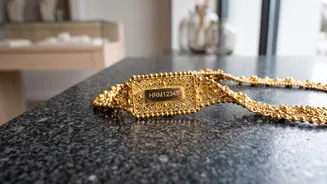
Since 2021, all newly hallmarked jewellery must carry three specific marks, which are typically laser-engraved on an inner surface or near the clasp. Ask the jeweller for a magnifying loupe to see them clearly. The first is the triangular BIS logo, which confirms the piece has been certified. The second is the purity grade, such as '22K916' (for 91.6% pure gold) or '18K750' (for 75% pure gold). The third and most crucial mark is the six-character alphanumeric Hallmark Unique Identification (HUID) number. This code is a unique digital fingerprint for that specific piece of jewellery, linking it to a central database.
Your Tool: The BIS Care App
The BIS Care app is a free mobile application from the Bureau of Indian Standards, available on both Android and iOS. Its primary function for jewellery buyers is the 'Verify HUID' feature. This allows you to instantly check the official record of the piece you are about to buy. Before you even head to the store, it is wise to download the app and complete the simple registration process, which requires your name and mobile number. The app serves as your personal verification device, putting the power of authentication directly into your hands.
How to Verify Your Jewellery in Seconds
Using the app at the jewellery counter is a straightforward process. First, open the BIS Care app on your smartphone. On the home screen, you will find an option labelled 'Verify HUID'. Select it. You will be prompted to enter the six-character HUID that you see engraved on the jewellery. It is critical to enter this code exactly as it appears, paying close attention to letters versus numbers (e.g., 'O' vs. '0'). Once you enter the code and tap search, the app will retrieve the details from the BIS database.
What the Verification Results Mean
A successful verification will display a wealth of information about the item. This includes the purity (e.g., 22K916), the type of article (like 'ring' or 'bangle'), the name of the jeweller who submitted it for hallmarking, and the details of the Assaying and Hallmarking Centre that tested it. Your job is to cross-reference these details. Does the purity shown in the app match what is stamped on the item and written on your bill? Does the article type match the piece you're holding? A mismatch is a significant red flag that should be addressed before making payment.
What to Do If Something is Wrong
If the app shows 'record not found' or the details don't match, the first step is to double-check the HUID you entered for any typos. If it's correct and still shows an error, you should immediately bring it to the jeweller's attention. If you are not satisfied with the explanation, do not proceed with the purchase. The BIS Care app has a built-in 'Complaints' feature that allows you to report the discrepancy directly to the Bureau of Indian Standards. You can fill out a form, describe the issue, and even upload photos as evidence. BIS will then investigate the matter.