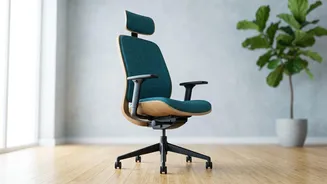







The Foundation: Your Chair
Your chair is the most critical piece of the ergonomic puzzle. Simply having an 'office chair' isn't enough; it must be adjusted to fit your body. Start with seat height. Your feet should be flat on the floor with your thighs parallel to the ground, forming
a roughly 90-degree angle at your knees. If your feet dangle, use a footrest. Next, ensure there is a small gap—about two to three fingers' width—between the edge of the seat and the back of your knees to avoid cutting off circulation. Finally, address the lumbar support. This crucial feature should fit into the natural inward curve of your lower back, roughly at your belt line. Adjust the height and depth so it provides gentle, continuous support without pushing your spine into an unnatural arch. If your chair lacks built-in support, a rolled-up towel or a small pillow can work in a pinch.
The Eye-Level Rule: Your Monitor
Hunching forward to see your screen is a primary cause of neck and upper back pain. To fix this, position your monitor directly in front of you, about an arm's length away. The most important adjustment is height: the top of your screen should be at or slightly below your eye level. This allows you to look slightly downward without dropping your head. If you work on a laptop, you're almost guaranteed to be looking down. The solution is to elevate it—using a stack of books or a dedicated stand—and use a separate keyboard and mouse. This de-couples the screen from the keyboard, allowing you to position both at their correct, independent heights.
The Neutral Zone: Keyboard and Mouse
Just as your chair and monitor need to be in the right place, so do your keyboard and mouse. These tools should be positioned at a height that allows your elbows to be bent at a roughly 90-degree angle, with your forearms parallel to the floor. Your shoulders should be relaxed, not hunched up towards your ears. When typing, try to keep your wrists in a neutral, straight position, rather than bent up or down. Resting your wrists on the desk while typing can create pressure points, so it's better to keep them slightly elevated. Ergonomic keyboards and mice are designed to promote a more natural hand and wrist posture and can be a worthwhile investment if you experience wrist or hand pain.
Beyond the Desk: Habits That Help
An ergonomic setup is a fantastic start, but static posture is still a major source of strain. Your body is designed to move. The single most effective habit you can build is to take regular movement breaks. Aim to stand up, stretch, or walk around for a couple of minutes at least every 30 to 45 minutes. This promotes circulation, reduces stiffness, and gives your muscles a rest. Simple stretches can also provide immense relief. Try a seated chest opener by clasping your hands behind your chair and pulling your shoulders back to counteract slouching. A seated spinal twist, where you gently rotate your upper body to one side while holding onto your chair, can help reduce tension in the lower back. A standing back extension—placing your hands on your lower back and gently arching backward—can reverse the effects of prolonged sitting.