





Why Photos Are Your First Defence
In the world of peer-to-peer rentals, photos are more than just marketing; they are a critical part of the informal contract between the owner and the renter. For the owner, good photos attract renters. For the renter, they are the primary tool for verifying
an item's condition before committing. These images set the expectation for what you will receive. An item described as 'like new' should be backed by clear, detailed pictures that support the claim. A listing with blurry, dark, or minimal photos should be an immediate red flag, suggesting that the owner may be hiding imperfections.
How to Scrutinise Listing Photos
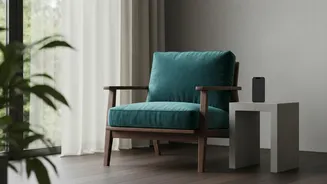
Don't just glance at the pictures; investigate them. Look for high-resolution images taken from multiple angles—front, back, sides, and any important functional parts. Pay close attention to close-ups that show areas prone to wear and tear. If you are renting a sofa, for instance, you want to see the condition of the fabric, cushions, and legs. Check for consistency in lighting and background. A mix of professional stock photos and a few poorly lit phone pictures can be a sign that the item's actual condition is not being accurately represented. Be wary of listings that only show the item from a distance or in packaging.
Don't Be Afraid to Ask for More
If the provided photos are insufficient, you are well within your rights to request more information. Ask the owner for specific shots of areas that concern you. A great way to get a more dynamic and hard-to-fake view is to request a short video. Ask the owner to do a quick walk-around of the item, perhaps even showing it in operation if it's a piece of equipment. A seller who is confident in their item's condition will usually be happy to comply with a reasonable request for more visuals. A hesitant or defensive response could be a warning sign.
Create Your Own Visual Record
Once the item arrives, your job as a documentarian begins. Before you do anything else, take your own set of photos and videos. This is your evidence of the item's condition upon delivery. Capture the same level of detail you looked for in the listing: all angles, close-ups of any existing scuffs, scratches, or stains, and its general state of cleanliness. It is crucial that this documentation is created immediately upon receipt, before you use the item. Many rental platforms require you to report issues within a very short window, sometimes as little as 12 or 24 hours. Your time-stamped photos will be essential if a dispute arises.
What to Do If It Doesn't Match
If the item is not as described—for example, it's dirtier, more damaged, or a different model than what was pictured—act immediately. Do not use the item. Contact the owner and the rental platform's support system right away. Provide them with the visual evidence you just collected, comparing it to the original listing photos. A clear, factual report supported by photographic evidence is the most effective way to resolve the situation. This documentation is your proof in any potential dispute over refunds or damage claims. Platforms will use this evidence to determine if the item qualifies as 'not as described' and guide you on returns and refunds.