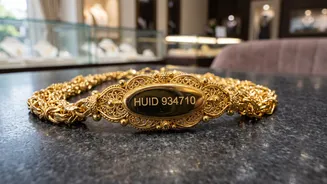






Buying gold is a significant investment for any Indian household. The government's mandatory Hallmark Unique ID (HUID) system is a powerful tool designed to protect you, but it only works if you use it. Here’s why and how to verify your purchase.
What is a Hallmark Unique ID?
The Hallmark
Unique Identification (HUID) is a six-character alphanumeric code, like 'AZ4K19', that is laser-engraved onto every piece of hallmarked gold jewellery. Since mandatory hallmarking was rolled out by the Bureau of Indian Standards (BIS), this code has become a digital fingerprint for your gold. It is unique to each individual item, meaning in a pair of earrings, each earring will have its own distinct HUID. This system was introduced to address the shortcomings of older hallmarking methods, where stamps could be faked. The HUID links your specific piece of jewellery to a central, digital record containing details of its purity, the jeweller who had it certified, and the Assaying and Hallmarking Centre (AHC) that tested it.
Understanding the Modern Hallmark
A genuine, modern BIS hallmark consists of three distinct marks that you should be able to see, though you may need a magnifying glass. The first is the triangular BIS logo, confirming the piece has passed through the official certification system. The second is the purity grade, which tells you the gold content. For example, '22K916' means the item is 91.6% pure gold (22-karat), while '18K750' means it is 75% pure gold (18-karat). The third and most crucial mark for verification is the six-character HUID. Jewellery hallmarked before July 2021 might have an older, four-mark system without a HUID, which is still valid for pieces already with consumers.
Your Step-by-Step Verification Guide
Verifying your gold at the counter takes only a minute and is the single best way to ensure you're getting what you paid for. First, download the official 'BIS CARE' app from the Google Play Store or Apple App Store, ensuring the publisher is the Bureau of Indian Standards. After a quick registration with your mobile number, open the app and select the 'Verify HUID' option on the home screen. Ask the jeweller to show you the HUID on the ornament; it's often on the inside of a ring or near the clasp of a chain. Carefully type this six-character code into the app and hit search.
Decoding the Verification Results
Once you enter the HUID, the app will display the official record for that specific piece of jewellery. You should check a few key details. The app will show the purity (e.g., 22K916), which must match what is stamped on the jewellery and printed on your bill. It will also list the 'Type of Article' (e.g., ring, chain, bangle), the jeweller's registration details, and the AHC where it was tested. A mismatch in any of these details—for example, if the HUID for a bangle returns a record for a ring—is a major red flag. Some pilot programmes are also including the item's weight and a photograph in the record for an even more robust check.
What to Do if the Details Don't Match
If the HUID does not return a result or the details are incorrect, the first step is to double-check the code you entered for typos. If it still doesn't match, you should immediately bring it to the jeweller's attention before making the payment. An honest seller should be able to provide a clear explanation. If they cannot resolve the discrepancy, it is safest to walk away from the purchase. For issues discovered after purchase, you can file a formal complaint through the BIS CARE app itself. If a hallmarked item is found to be of lower purity, consumers are entitled to compensation, often twice the value of the shortfall, plus testing fees.