



Why Your Setup Causes Pain
Your spine has a natural S-shaped curve that helps it distribute pressure evenly. When you sit for long periods in a chair that isn't adjusted for your body, or stare at a monitor that's at the wrong height, you disrupt this balance. Slouching or leaning
forward flattens the curve in your lower back, which increases pressure on your spinal discs. Over time, this leads to muscle fatigue, stiffness, and chronic lower back pain. An ergonomic setup isn't about finding one “perfect” posture, but about creating an environment that supports your body's natural alignment with minimal effort.
Start With Your Chair Height
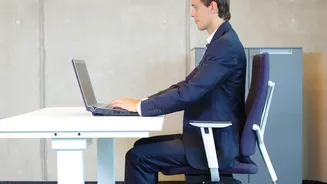
The foundation of a good setup begins with your feet. Adjust the height of your chair so that your feet rest flat on the floor, with your knees bent at approximately a 90-degree angle. Your thighs should be roughly parallel to the floor. If your feet don't reach the floor after setting the height relative to your desk, use a footrest. This simple adjustment ensures your weight is properly distributed, taking stress off your lower back from the very start.
Fine-Tune Your Seat and Backrest
Next, address the seat itself. You should sit all the way back, so your hips and lower back are making full contact with the chair's backrest. There should be a small gap, about two to three fingers' width, between the front edge of the seat and the back of your knees. This prevents the seat from cutting off circulation. Most importantly, adjust the lumbar support. The firmest point should be positioned to fit the natural curve of your lower back, roughly at your belt line. This support is crucial, as it prevents you from slouching and maintains the spine's healthy curve.
Set Your Monitor at Eye Level
A poorly positioned monitor is a primary cause of both neck and back pain because it forces you to lean or crane your neck. To find the correct height, sit back in your chair in a neutral, comfortable position. The top edge of your monitor screen should be at or slightly below your eye level. Your eyes should naturally hit the top third of the screen when looking straight ahead. If you work on a laptop, using a separate stand or even a stack of books to raise the screen is essential. The monitor should also be about an arm's length away, placed directly in front of you to avoid twisting your neck.
Don't Forget Your Arms
Armrests play a key role in reducing strain on your shoulders and upper back. Adjust them so that your elbows can rest at a roughly 90-degree angle, with your shoulders relaxed and not hunched. Your forearms should be about parallel to the floor when you are typing. This allows your arms to be supported without creating tension that travels up into your neck and back. If your armrests prevent you from getting close enough to your desk, it might be better to lower them out of the way.
The Best Posture Is Your Next Posture
Even with the perfect ergonomic setup, remaining in one static position for hours is unhealthy. Your body is designed to move. Make a habit of taking short breaks every 30 to 60 minutes to stand up, stretch, and walk around. Shifting your position frequently allows different muscles to engage and relieves the constant load on your spine. Think of your ergonomic setup not as a way to stay perfectly still, but as a supportive home base you can return to between movements.