






The Science Behind the Strain
When your monitor is too low, you naturally tilt your head forward and down to see the screen. This posture, often called "tech neck," dramatically increases the load on your cervical spine. The human head weighs about 5 kilograms, but tilting it forward just
15 degrees can make it feel like 12 kilograms to your neck muscles. At a 45-degree angle, that force jumps to over 22 kilograms. This constant forward head posture forces the muscles in your upper back and neck to work overtime to support the weight, leading to muscle fatigue, stiffness, and pain. Over time, this strain isn't just muscular; it can affect the joints and discs in your spine, contributing to chronic conditions.
How to Find Your Perfect Monitor Height
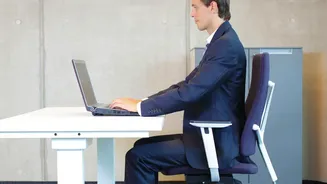
Finding the correct monitor height is simple and follows a straightforward ergonomic principle: your screen should be positioned to encourage a neutral posture. Sit comfortably in your chair with your back supported and feet flat on the floor. The top line of your monitor's screen should be at or slightly below your eye level. This setup allows your eyes to look slightly downward to view the center of the screen, which should be about 15 to 20 degrees below your horizontal line of sight. This position keeps your head balanced directly over your shoulders, minimizing strain. If you wear bifocals, you may need to lower your monitor a bit more and tilt it back to avoid tipping your head back to see clearly.
Don't Forget Distance and Angle
Height is critical, but it works in tandem with distance and angle. Your monitor should be positioned at least an arm's length away, typically between 20 and 40 inches (50 and 100 cm). If you have a larger monitor, you'll need more distance to see the whole screen comfortably without turning your head excessively. Sitting too close can cause eye strain, while sitting too far may cause you to lean forward, defeating the purpose of setting the correct height. To reduce glare, which can also cause you to adopt awkward postures, tilt the monitor back slightly, around 10 to 20 degrees. Also, ensure the screen is placed directly in front of you to avoid twisting your neck.
The Long-Term Risks of Ignoring Ergonomics
Consistently working with a poorly positioned monitor is more than just a source of daily aches. It can lead to a host of long-term musculoskeletal issues. Chronic neck and upper back pain are the most common complaints, often accompanied by tension headaches that originate from strained neck muscles. Over time, the sustained pressure on your spine can contribute to more serious conditions like spinal misalignment, disc issues, and nerve compression, which might cause tingling or numbness in your arms and hands. These problems not only impact your physical health but can also affect your focus, productivity, and even your mental well-being due to chronic discomfort.
Complete Your Ergonomic Workstation
A well-positioned monitor is a huge step, but it's part of a larger system. Ensure your chair provides good lumbar support, allowing you to sit with your back straight and shoulders relaxed. Your feet should be flat on the floor, with your knees at roughly a 90-degree angle. Your keyboard and mouse should be close enough that your elbows can rest comfortably at your sides, with your wrists in a neutral, straight position to prevent strain. Most importantly, remember to move. No posture is perfect if held for too long. Take frequent short breaks every 30-60 minutes to stand, stretch, and walk around. These small movements improve circulation and give your muscles a much-needed break.