







Start with Your Foundation: The Chair
Before you worry about anything else, get your chair right. You don’t necessarily need a fancy, expensive model; it’s about how you use what you have. Adjust the height so your feet rest flat on the floor, with your knees bent at roughly a 90-degree angle.
Your thighs should be parallel to the floor or angled slightly downward. Most importantly, sit all the way back in your chair so that your spine is supported. If your chair lacks good lumbar support, a rolled-up towel or a small cushion placed at the small of your back can make a world of difference in maintaining your spine's natural curve. Your shoulders should be relaxed, not hunched up towards your ears.
Set Your Sights: Monitor Placement
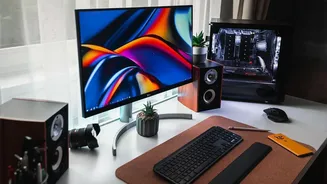
Hunching forward to see your screen is a primary cause of neck and shoulder pain. The solution is to bring the monitor to you. Position your screen directly in front of you, about an arm's length away. The top of the screen should be at or just below your eye level. This allows you to keep your head in a neutral, relaxed position, stacked directly over your shoulders. If you work on a laptop, this is nearly impossible without help. Prop your laptop up on a stack of books or a dedicated stand to raise the screen height, and use a separate keyboard and mouse. This single change can dramatically reduce the strain that leads to tension headaches and stiff necks.
Align Your Wrists and Arms
Wrist and forearm pain often stems from awkward angles while typing and using a mouse. Your keyboard and mouse should be positioned at a height that allows your elbows to be bent at a comfortable, open angle of around 90 to 110 degrees. Your arms should be close to your body, and your wrists should remain as straight and neutral as possible, not bent up, down, or to the side. Avoid resting your wrists on the hard edge of a desk, which can compress nerves over time. If you use a wrist rest, it should be to support the palm of your hand during pauses, not for resting your wrists on while actively typing.
Adopt the 20-20-20 Rule
Staring at a screen for hours doesn't just tire your eyes; it makes them dry and strained because you blink less. To combat this, practice the 20-20-20 rule. Every 20 minutes, take a 20-second break to look at something at least 20 feet away. This simple exercise allows the tiny muscles in your eyes to relax from the constant effort of focusing up close. Set a timer on your phone or computer as a reminder. Look out a window or down a long hallway. This small, consistent habit is one of the most effective ways to reduce digital eye strain, blurred vision, and screen-related headaches.
Make Movement a Priority
Perhaps the most crucial habit is to not stay in one position for too long, no matter how perfect your ergonomic setup is. The human body is designed to move. Prolonged sitting slows your metabolism and can increase the risk of numerous health issues. Aim to get up from your desk at least once an hour. Better yet, try to stand for a few minutes every half hour. Walk to get some water, do a few simple stretches, or just march in place. These short movement breaks boost circulation, prevent muscle stiffness, and even improve your focus and productivity when you return to your task. Even two minutes of movement can make a significant difference.