





Reprint vs. Correction: Know the Difference
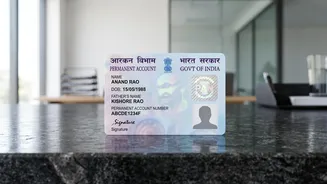
Before starting, it's crucial to understand what you need. A 'Reprint' or 'Reissue' is for when your card is lost, stolen, or damaged, but all your details (name, date of birth, etc.) on it are correct. You are simply requesting a new physical copy. If
your details have changed, you need to apply for a 'Change or Correction in PAN Data'. This guide focuses on reprinting a PAN card with no changes to the existing data. Your 10-digit PAN number will remain the same.
Gather Your Essentials
The modern online process is incredibly smooth, especially if your Aadhaar is up to date. Here’s what you should have ready: - Your 10-digit PAN number.- Your Aadhaar number.- Your date of birth.- A mobile number linked to your Aadhaar for receiving the One-Time Password (OTP) for e-KYC verification.- Access to online payment methods like a credit card, debit card, net banking, or UPI. The fee for reprinting a PAN card for delivery to an Indian address is approximately ₹50. For a foreign address, the fee is around ₹959. If you don't use the Aadhaar OTP method, you may need to upload a copy of your ID, address, and date of birth proof.
Choose Your Official Portal: Protean or UTIITSL
The Income Tax Department of India has authorised two main portals to manage PAN applications and reissues: Protean (formerly NSDL e-Gov) and UTI Infrastructure Technology and Services Limited (UTIITSL). Both are official and reliable. The process is very similar on both platforms. You can typically use either one, but sometimes the system works best if you use the same portal through which your original PAN was issued. If one portal doesn't recognise your PAN, simply try the other.
Step-by-Step Guide: Reissue via Protean (NSDL)
This is one of the most common methods for reissuing a PAN card.1. Visit the Protean eGov Technologies Limited website and find the section for 'Reprint of PAN Card'.2. You'll be asked to enter your PAN, Aadhaar number, and date of birth.3. After submitting, your masked personal details (like mobile number and email) will be displayed for verification.4. You will need to complete an OTP verification. The OTP will be sent to the mobile number and/or email registered with your Aadhaar or PAN records.5. Once the OTP is validated, you will be directed to the payment gateway. Pay the fee online.6. After successful payment, an acknowledgement slip with a 15-digit number will be generated. Save this number for future reference.
Step-by-Step Guide: Reissue via UTIITSL
The process on the UTIITSL portal is just as straightforward.1. Go to the UTIITSL website and navigate to the 'Reprint PAN Card' service.2. Enter your PAN, Aadhaar number, date of birth, and the captcha code.3. Verify your details and confirm the reprint request.4. Authenticate the request using the OTP sent to your Aadhaar-linked mobile number.5. Proceed to pay the required fee online.6. After payment, an application reference number will be generated. Keep this number safe to track your application.
After You Apply: Tracking and Delivery
Once your application is submitted, you don't have to guess its status. Both Protean and UTIITSL portals have a dedicated 'Track PAN Status' section. You can enter your 15-digit acknowledgement or application number to see updates. If you opted for an e-PAN, it is often sent to your registered email address within a few hours to a couple of days. The physical PAN card is dispatched to the communication address on record with the Income Tax Department, which is usually the address on your Aadhaar card. It typically takes about 10-20 days for the card to be printed and delivered.