







Why Jupiter Is Your Perfect Target
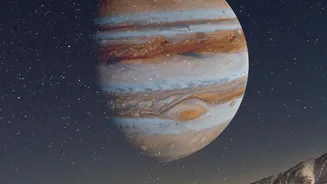
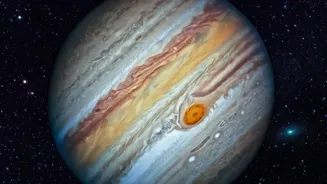
In the celestial ballet, some dancers are easier to spot than others. Jupiter is an ideal target for urban stargazers because it’s one of the brightest objects in the night sky, often outshone only by the Moon and Venus. Its brilliance allows it to cut
through a significant amount of urban light pollution. For much of late 2026, Jupiter is a dominant feature in the evening sky, making it conveniently visible for after-work viewing. This consistent brightness means you don’t need a high-powered telescope or a remote mountain peak to get a glimpse; you just need to know where to look.
Your Pocket Planetarium: Essential Apps
The most critical tool for this cosmic hunt is a stargazing app, which uses your phone's GPS and compass to create an augmented-reality map of the sky. Simply point your phone upwards, and the app will identify stars, constellations, and planets in real time. For beginners, user-friendly options like Star Walk 2 and SkyView are excellent choices, offering intuitive interfaces and beautiful graphics. Another top-tier free option is Stellarium Mobile, which provides a highly accurate and clean view of the sky. These apps remove the guesswork, instantly showing you Jupiter's precise location, even if it’s currently invisible to your naked eye.
Scout Your Location: Beating the Glow
While you can't eliminate city light, you can minimise its impact. The key is to reduce direct glare. Find a spot where buildings or trees block the direct view of streetlights. A local park, a rooftop, or even a top-floor balcony can be a significant improvement over a brightly lit street. The later you look, the better; some city lighting is reduced after midnight. Before you start, give your eyes about 15-20 minutes to adjust to the darkness. This will dramatically increase your ability to pick out fainter objects. Shielding your phone screen's light will also help preserve your night vision.
The Technique: From Finding to Seeing
Once you've launched your stargazing app, use its search function to locate Jupiter. Follow the on-screen arrow until your phone is pointing directly at the planet. Now, put the phone down and look in that same direction with your own eyes. In most city conditions, Jupiter will appear as a very bright, steady, and non-twinkling star. Don't be discouraged if it looks small; the victory is in finding it. The real magic of your smartphone comes next, when you try to photograph it.
Capturing the Giant: Smartphone Photography Tips
Photographing a distant planet is a challenge, but modern smartphones are surprisingly capable. First, stability is everything. Rest your phone on a tripod, or lean it securely against a stable surface like a wall or car roof to prevent blur. Avoid the digital zoom, as it just degrades image quality; use your phone's main camera lens. Many phones have a 'Night Mode' that automatically uses longer exposures. For even better results, see if your phone's camera app has a 'Pro' or 'Manual' mode. If so, manually lower the ISO to reduce brightness and prevent Jupiter from looking like a 'blown out' white blob. Tap the screen to focus on the planet. You won't get a detailed image of its cloud bands, but you may capture a sharp, bright disc and, if you're lucky, some of its four largest moons appearing as tiny pinpricks of light nearby.