






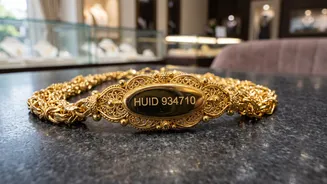
Buying gold is a significant investment, but fears of being sold impure metal have always lingered. Now, a free government app puts the power of verification directly into your hands, changing how you can secure your purchase before you even pay.
The Three Marks of Trust
Since
mandatory hallmarking was rolled out, every piece of new gold jewellery sold in notified districts must carry three specific, laser-engraved marks. The first is the triangular logo of the Bureau of Indian Standards (BIS), signifying that the item falls under the government's certification scheme. The second is the purity grade, which states both the karat and the fineness (e.g., '22K916' for 22-karat gold that is 91.6% pure). The third, and most critical for verification, is the Hallmark Unique Identification (HUID) number. These marks are often tiny, so you may need to ask the jeweller for a magnifying loupe to see them clearly—a standard request they should accommodate.
What is the HUID Number?
The HUID is a six-character alphanumeric code, like 'AB1234', that is unique to each individual piece of jewellery. Think of it like a serial number for your gold ornament. No two pieces, not even two earrings in a matching pair, will have the same HUID. This code is assigned at a BIS-recognised Assaying and Hallmarking Centre (AHC) when the item is tested for purity. Its purpose is to create a digital trail for every piece, linking it to a specific record in the BIS database. Since April 2023, it is mandatory for registered jewellers to only sell jewellery that carries a HUID.
Using the BIS Care App
The Bureau of Indian Standards offers a free mobile application called 'BIS Care' for both Android and iOS devices. This is the official tool for consumers to verify their products. Once you have downloaded and registered on the app, the process is straightforward. Select the 'Verify HUID' option on the home screen. You can then type in the six-character code from the jewellery. Be careful to enter it exactly as it appears, as it can be easy to confuse letters and numbers like '0' and 'O'. Once entered, the app searches the BIS database for the corresponding record.
Decoding the Verification Results
If the HUID is genuine, the app will display a set of details linked to that specific piece of jewellery. This includes the purity grade (e.g., 22K916), the type of article (ring, bangle, chain, etc.), the details of the jeweller who submitted it for hallmarking, and information about the AHC that certified it. Your job is to cross-check this information against the piece in your hand and the details on the bill. Does the purity match what the salesperson told you? Does the article type match what you are buying? This simple check, which takes less than a minute, provides a powerful, independent confirmation of the jeweller's claims.
What to Do if Something is Wrong
If the app shows 'Record Not Found', the first step is to double-check the code for any typos. If it still doesn't verify, it's a major red flag that the HUID may not be genuine. Similarly, if the details on the app contradict the physical item—for example, the app says 'ring' but you are holding a chain, or the purity is 18K when you were told it is 22K—you should not proceed with the purchase until you get a clear explanation. The BIS Care app also has a 'Complaints' feature that allows you to report such discrepancies directly to the authorities. You can submit details of the issue along with photos and screenshots, creating an official record of the problem.