




The Foundation: Your Chair
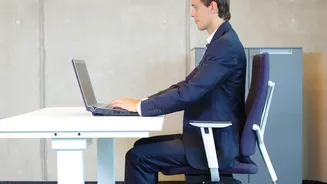
The fight against back pain begins with how you sit. Your chair is the foundation of your posture, and getting it right is crucial. Start by adjusting the height. Your feet should rest flat on the floor with your thighs parallel to the ground, creating
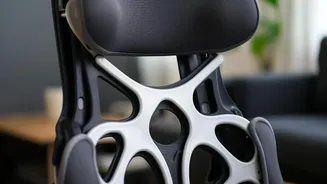
a roughly 90-degree angle at your knees. If your feet dangle, use a footrest. Next, consider the recline. While sitting perfectly upright at 90 degrees seems correct, research suggests that a slightly reclined posture of 100 to 110 degrees can actually reduce pressure on your spinal discs. Ensure your lower back is fully supported. Your buttocks should be pressed against the back of the chair, with a cushion or built-in lumbar support filling the natural curve of your spine to prevent slouching. Armrests should be positioned to allow your shoulders to relax and your elbows to bend at a comfortable angle, close to your body.
The Focal Point: Your Monitor
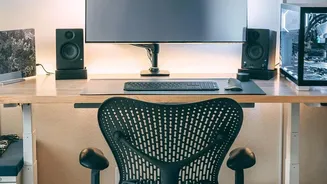
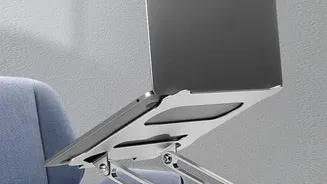
Constantly looking down or up at your screen forces your neck and upper back into strained positions, which has a knock-on effect that can lead to lower back pain. The goal is to achieve a neutral head and neck position. To do this, place your monitor directly in front of you, about an arm's length away. The top of the screen should be at or slightly below your eye level. This allows your eyes to gaze slightly downward, which is their natural resting position, without forcing you to crane your neck. If you use a laptop, this setup is nearly impossible without help. Invest in an external keyboard and mouse, and place your laptop on a stand or a stack of books to raise the screen to the correct height. If you wear bifocals, you might need to lower your monitor a bit more to avoid tilting your head back to see clearly.
The Posture: Putting It All Together
With your chair and monitor correctly positioned, it’s time to focus on your posture. Think of maintaining a neutral spine, where your head is balanced directly over your shoulders, and your shoulders are aligned with your hips. Avoid the common habit of 'desk shrimping'—hunching forward with a rounded upper back. Your elbows should remain close to your body, bent at an angle of 90 degrees or slightly more. Your wrists should be in a straight, neutral position while typing, not bent up, down, or to the sides. This entire setup—feet flat, knees at 90 degrees, hips slightly open, back supported, shoulders relaxed, and monitor at eye level—creates an ergonomic alignment that minimizes stress on your entire musculoskeletal system, from your neck down to your lower back.
The Missing Piece: Regular Movement
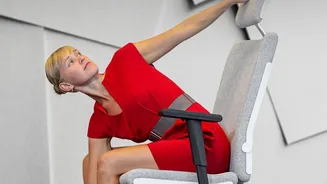
Even the most perfectly ergonomic setup has a limitation: it's static. Prolonged sitting, no matter how good your posture, increases pressure on spinal discs and reduces blood flow. The human body is designed to move. To counteract the negative effects of sitting, you must incorporate regular movement into your day. Follow the 20-20-20 rule to combat eye strain: every 20 minutes, look at something 20 feet away for 20 seconds. More importantly, get up from your chair at least once every hour. Walk around, do some simple stretches for your back, neck, and hips, or just stand for a few minutes. These short breaks increase circulation, relieve muscle tension, and give your spinal structures a much-needed rest from the compressive forces of sitting.