






The Daily Toll of a Bad Setup
Spending hours at a computer with a poorly positioned keyboard and mouse can lead to more than just temporary discomfort. It contributes to Repetitive Strain Injuries (RSIs), a broad term for painful conditions affecting muscles, tendons, and nerves.
Conditions like carpal tunnel syndrome, tendonitis, and general pain in the wrists, elbows, shoulders, and neck are common outcomes. This happens because unnatural postures force your body to compensate, putting sustained stress on areas not designed for it. Over time, these small, repetitive movements can accumulate, leading to chronic pain, inflammation, numbness, and reduced mobility that can interfere with both work and daily life.
The Goal: Finding Your Neutral Posture
The key to ergonomic comfort is maintaining a 'neutral' posture, where your joints are naturally aligned and under the least amount of stress. For your arms and hands, this means your wrists should be straight, not bent up, down, or to the side. Your elbows should be bent at roughly a 90 to 110-degree angle, hanging relaxed and close to your body. Your shoulders should be relaxed and not hunched or raised. Achieving this neutral stance is the foundation of a comfortable setup and significantly reduces the strain that leads to injury.
Positioning Your Keyboard Correctly
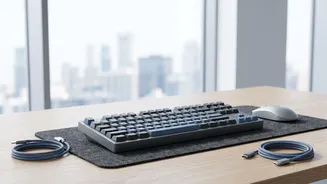
Your keyboard should be placed directly in front of you and centered with your body. Its height is critical: adjust your chair and desk so that when your arms are relaxed at your sides, your hands are at or slightly below elbow level. This ensures your shoulders can relax and your wrists can remain straight. The keyboard should be close enough that you don't have to reach for it, which keeps your elbows near your body. As for tilt, it's often best to keep the keyboard flat or even tilted slightly away from you (a negative tilt), rather than propping up the feet, which can force your wrists to bend upwards.
Taming the Mouse
A poorly placed mouse is a primary cause of shoulder and arm strain. Your mouse should sit on the same surface and at the same height as your keyboard. Crucially, it must be placed right next to the keyboard to prevent you from reaching or 'winging' your arm out to the side. The further you have to stretch, the more strain you put on your shoulder. When using the mouse, try to initiate movements from your elbow rather than just flicking your wrist. If you find a standard mouse uncomfortable, you might explore ergonomic alternatives like vertical mice or trackballs, which can place your hand in a more natural position.
Good Habits Make a Difference
Beyond the initial setup, your daily habits play a huge role in your comfort. The human body isn't designed to stay still for long periods. Make it a point to take frequent, short breaks. Every 30 to 60 minutes, get up, walk around, and stretch your hands, wrists, shoulders, and neck. Even a 30-second 'micro-break' every 10 minutes can help relieve muscle tension. When you are not actively typing, let your hands rest in your lap rather than hovering over the keyboard or resting them on a wrist rest, which can sometimes create pressure points if used incorrectly.