





The Chair: Your Foundation for Good Posture
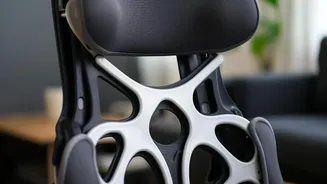
Your office chair is the most critical piece of the ergonomic puzzle. Start by adjusting its height. Stand in front of it and set the seat so its highest point is just below your kneecap. When you sit down, your feet should be flat on the floor with your knees
bent at roughly a 90-degree angle. If your feet are dangling, use a footrest. Next, address the seat depth. You should have a gap of about two to three fingers' width between the front edge of the seat and the back of your knees. Adjust the backrest so it supports the natural curve of your lower back, fitting snugly into the hollow. Finally, set the armrests so your elbows can rest at a 90 to 100-degree angle with your shoulders relaxed. If the armrests prevent you from getting close to your desk or force your shoulders up, it is better to lower them or remove them completely.
The Monitor: Finding Your Eye Level
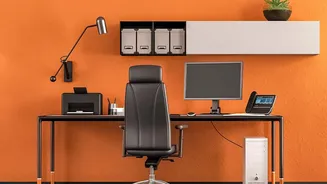
Incorrect monitor placement is a primary cause of neck and shoulder strain. Position your screen directly in front of you, about an arm's length away. The ideal distance is typically between 20 and 30 inches. The height is just as important. The top of the monitor should be at or slightly below your eye level. This allows your eyes to naturally look slightly downward when viewing the center of the screen, keeping your head in a neutral position. If your monitor is too low, propping it up with a stand or a stack of sturdy books is a simple and effective solution. For those who wear bifocals, lowering the monitor an extra inch or two can provide a more comfortable viewing angle without needing to tilt your head back.
Keyboard and Mouse: Neutral Wrists are Happy Wrists
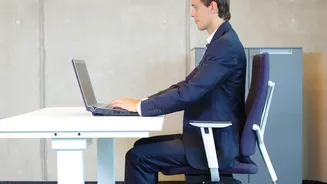
Your keyboard and mouse should be positioned to keep your wrists straight and your shoulders relaxed. Place them close to you on the same surface, about 5 cm from the edge of the desk, so your elbows remain near your body. When typing, your elbows should be bent at a 90 to 110-degree angle, with your forearms parallel to the floor or resting lightly on the armrests. The mouse should be placed immediately next to the keyboard to avoid overreaching, which can strain your shoulder. If you work primarily on a laptop, consider investing in an external keyboard and mouse. This allows you to position the laptop screen at eye level (on a stand or books) while keeping the keyboard and mouse at a comfortable height for your arms and wrists.
Putting It All Together: Your Ideal Posture
With your equipment arranged, the final step is to adopt the correct posture. Sit back fully in your chair so your spine is supported. Your head should be balanced directly over your shoulders, not jutting forward. Keep your shoulders relaxed and down, not hunched toward your ears. Your hips and knees should remain at roughly 90-degree angles, and your feet should be flat on the floor or a footrest. Try to avoid crossing your legs for extended periods, as this can misalign your hips and spine. A neutral, supported posture reduces stress on your muscles and joints, preventing the slow buildup of discomfort that leads to chronic pain.
Movement is Medicine
Even the most perfect ergonomic setup can't compensate for a completely sedentary day. Prolonged sitting puts pressure on your spine and can lead to muscle stiffness. It is crucial to take frequent breaks. Aim to get up, stretch, and move around for a few minutes at least once every hour. Stand up when taking phone calls, walk to a coworker's desk instead of sending an email, or simply do some gentle stretches at your desk. Alternating between sitting and standing, if you have an adjustable desk, can also be beneficial for reducing muscle fatigue and keeping your spine aligned. These small movements throughout the day are just as important as your initial setup for long-term health and comfort.