





Understanding the Hallmark Unique ID (HUID)
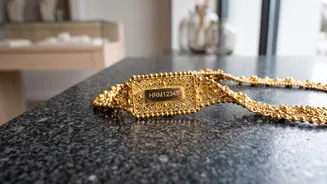
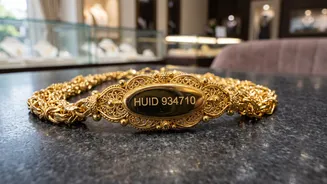
For years, hallmarking has been a sign of purity. But the introduction of the Hallmark Unique ID, or HUID, has transformed it from a simple stamp into a powerful digital verification tool. HUID is a six-character alphanumeric code that is unique to every
single piece of hallmarked jewellery. No two rings, bangles, or necklaces will ever share the same HUID. This code is laser-engraved onto the item, usually near the traditional Bureau of Indian Standards (BIS) logo and the purity grade (e.g., 22K916). Think of it as a digital fingerprint for your jewellery, linking the physical item to a secure, centralized database managed by BIS. This system was made mandatory for jewellers in most parts of India from April 2023 to combat fraud, prevent duplication, and bring unprecedented transparency to the gold market.
Why Verification is Non-Negotiable
Relying on the jeweller's word or just visually spotting a hallmark is no longer enough. Verifying the HUID is a critical step that empowers you as a consumer. The primary reason is to ensure authenticity and protect yourself from counterfeit or wrongly marked items. By checking the HUID, you confirm that the piece has been officially tested at a BIS-recognised Assaying and Hallmarking Centre (AHC). The check reveals key details: the purity of the gold, the type of article (e.g., 'ring', 'chain'), the jeweller who had it certified, and the AHC that performed the test. This creates a transparent audit trail from the manufacturer to you. It ensures you are getting the exact purity you are paying for—for example, that a piece sold as 22K is not secretly 18K. This verification provides peace of mind and establishes a verifiable credential for your jewellery, which is invaluable if you ever decide to sell or exchange it in the future.
Your Step-by-Step Verification Guide
Verifying your jewellery’s HUID is a simple process that takes less than a minute. All you need is your smartphone and the official 'BIS CARE' app. 1. Download the App: Search for 'BIS CARE' on the Google Play Store or Apple App Store. Make sure you download the official app published by the Bureau of Indian Standards to avoid any fakes. 2. Locate the HUID: Ask the jeweller to show you the HUID on the item. It’s a tiny six-character code, so you may need a magnifying loupe or your phone’s camera zoom to read it clearly. It should be right next to the BIS logo. 3. Use the 'Verify HUID' Feature: Open the BIS CARE app and select the 'Verify HUID' option on the home screen. 4. Enter the Code: Carefully type the six-character alphanumeric code into the app. Be precise, as characters like 'O' and '0' or 'I' and '1' can be easily confused. 5. Cross-Check the Details: The app will instantly display the recorded details for that HUID. Compare what the app shows for 'Article Type' and 'Purity' with the piece you are holding and the details on your bill. The jeweller's name and AHC details will also be displayed.
What to Do If the Details Don't Match
If the verification fails, don't panic, but do take it seriously. First, double-check that you entered the code correctly. A simple typo is the most common reason for a 'record not found' error. If it still fails, or if the details shown in the app (like purity or item type) do not match the jewellery or the bill, you should not proceed with the purchase. Raise the discrepancy with the jeweller immediately and ask for a clear explanation. A genuine new piece from a registered jeweller should always verify correctly. If you are not satisfied with the response, you can use the 'Complaints' feature within the BIS CARE app to report the issue directly to the Bureau of Indian Standards. This reporting mechanism is a crucial part of holding the industry accountable and protecting all consumers.