






The Core Reason for the Separate Scan
The main reason you’re asked to remove large electronics from your carry-on is due to the limitations of older X-ray scanners still common in many airports. The dense components of a laptop, including its battery and other internal hardware, can be difficult
for X-rays to penetrate effectively. This creates a significant blind spot in the scanned image, potentially obscuring other items in your bag that might be prohibited or dangerous. By scanning the laptop separately, security officers get an unobstructed view of its internal components and a clearer picture of the other items in your bag, ensuring nothing is hidden.
The Outer Pocket Advantage
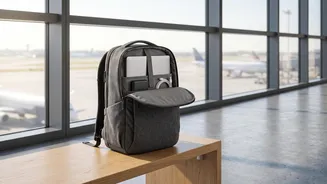
This is where the headline's advice proves its worth. When you place your laptop, tablet, or other large electronics in an easily accessible outer pocket or a dedicated tech sleeve, you eliminate the need to rummage through your entire bag. Imagine the scene: instead of kneeling on the floor and pulling out clothes and other items to reach a deeply buried laptop, you simply unzip an external compartment and place the device in the tray. This small act, repeated by every passenger, dramatically reduces fumbling and speeds up the entire queue. It’s about being prepared before you even reach the conveyor belt, making the process smoother for you and everyone behind you.
Know the Rules: What Comes Out?
Official guidelines from security bodies like India's Bureau of Civil Aviation Security (BCAS) and the U.S. Transportation Security Administration (TSA) mandate that personal electronic devices be screened separately. This typically includes laptops, tablets, and sometimes large cameras or e-readers. In India, rules are clear that all electronics, including phones and smartwatches, should be placed in the tray for screening. Power banks are also a key item to remember; they are considered spare batteries and must be carried in your hand luggage, not your checked baggage, and may need to be presented for screening. Being aware of these specific requirements prevents you from being pulled aside for a secondary bag check.
Choosing the Right Gear for a Smoother Journey
Modern travel backpacks are often designed with airport security in mind. Many feature a 'TSA-approved' or 'checkpoint-friendly' design. These bags have a separate laptop compartment that can be unzipped to lie flat on the scanner's conveyor belt, theoretically allowing you to keep the laptop inside the bag during screening. While this feature is helpful, its acceptance can vary by airport and the specific technology in use. Even without a lay-flat design, a backpack with a padded, easily accessible external laptop pocket is a huge asset. It provides protection for your device while making the security shuffle quick and efficient.
Beyond Gadgets: Other Security Speed Bumps
While electronics are a major focus, other items can also slow you down. The 100ml rule for liquids, aerosols, and gels is a common point of delay. Keep these items in a single, transparent, resealable bag and place it in an outer pocket alongside your electronics for easy access. Also, remember to remove belts with large buckles, and be prepared to take off jackets or even shoes if instructed. In Indian airports, services like DigiYatra can further expedite the process by using facial recognition to speed you through entry and security points, working alongside your web check-in.
The Future of Airport Screening
The tedious process of removing electronics may soon become a thing of the past. Many airports worldwide are upgrading to advanced Computed Tomography (CT) scanners. These machines create detailed 3D images of your bag's contents, allowing security officers to inspect items from all angles without needing you to remove anything. While the rollout is ongoing, with BCAS in India also mandating upgrades, it will take time for this technology to become standard everywhere. Until then, the tried-and-true method of packing smart remains your best bet for a swift security experience.