




The Golden Rule of UPI Safety
Before diving into specific scams, it's crucial to remember one fundamental principle: you only need to enter your UPI PIN when you are sending money or checking your balance. You never need to enter your PIN to receive money. If anyone asks you to enter your PIN to accept
a payment, it is unequivocally a scam. This single piece of knowledge can thwart a majority of common UPI frauds. Scammers rely on creating a sense of urgency or confusion to make you forget this rule. Always pause and think before authorising any transaction, especially if it's unexpected.
Decoding the Fake QR Code Scam
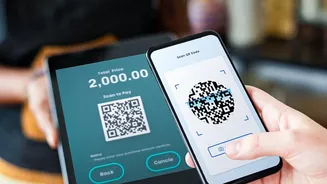
QR code fraud has become rampant, exploiting the trust users place in this technology. Scammers will send you a QR code via WhatsApp or another messenger, often when you are selling an item online or expecting a refund. They will claim that scanning the code and entering your PIN is necessary to receive the funds into your account. However, scanning a QR code is exclusively for making payments, not receiving them. When you scan their code and enter your PIN, you are actually authorising a payment from your account to theirs. Another variation involves fraudsters placing a sticker of their QR code over a genuine one at a physical store, redirecting your payment to their account instead of the merchant's. Always verify the merchant's name on your UPI app screen before confirming the payment.
Spotting Malicious Phishing Links
Phishing remains a classic and effective scamming technique. Fraudsters send text messages or emails that appear to be from your bank, a payment app, or another trusted entity. These messages often contain urgent warnings, such as a pending account blockage or an required KYC update, and include a link. Clicking this link takes you to a fake website that looks identical to the real one, designed to steal your UPI PIN, OTP, or other banking credentials. Scammers can also use these links to install malware on your phone, which can steal your financial information without you even noticing. Never click on links from unknown or suspicious sources. Always go directly to the official app or website by typing the address yourself.
The Deceptive 'Request Money' Trick
Most UPI apps have a feature that allows users to request money from others. Scammers abuse this by sending you a payment request, often with a note that says something like “Enter your PIN to receive your refund” or “Cashback of ₹5000”. If you are not paying close attention, the app's interface might look like you are about to receive money. Fraudsters often create a sense of urgency to rush you into approving the request. However, by entering your PIN, you are authorising a payment to the scammer. Always read the on-screen prompts carefully. Your app will clearly state whether you are about to 'Pay' or if money is being 'Received'. If you get a payment request from an unknown person, simply decline it.
Other Common Frauds to Watch For
Scammers are constantly evolving their methods. Be aware of other common tactics, such as fake customer support numbers listed online. When you call, the fraudster will pose as a support executive and trick you into sharing your details or installing a remote access app like AnyDesk or TeamViewer. These apps allow them to see your screen and control your device, giving them full access to your banking apps. Another trick is SIM swapping, where fraudsters convince your mobile operator to issue a duplicate SIM for your number, giving them control over your OTPs. Also, be wary of fraudsters impersonating officials or sellers on online marketplaces who rush you into making a payment.
Proactive Steps for a Secure UPI Experience
Beyond recognising individual scams, adopting good security habits is your best defence. Always use official UPI apps downloaded from the Google Play Store or Apple App Store. Enable transaction notifications via SMS and email and review them regularly to spot any unauthorised activity. Use a strong, unique PIN for your UPI and change it periodically. Never share your PIN or any OTP with anyone, no matter who they claim to be. Your bank or any legitimate company will never ask for this information. Finally, be cautious when using public Wi-Fi for financial transactions, as these networks can be less secure.