






The Anatomy of a Slouch
When your monitor is too low, you naturally crane your neck and tilt your head downwards to see the screen properly. This seemingly harmless habit is the start of a postural chain reaction. Your head is surprisingly heavy, weighing about 10 to 12 pounds.
For every inch your head juts forward, the force on your cervical spine (your neck) increases significantly. This forward head posture, often called "tech neck," forces the muscles in your neck and upper back to work overtime to support the weight. To compensate for this forward lean, your upper back rounds, and your shoulders slump forward, creating the classic slouching posture.
The Kinetic Chain: From Neck to Lower Back
Your spine is a connected system, a kinetic chain where misalignment in one area affects others. The slouch that starts at your neck doesn't stay there. As your upper back rounds, it flattens the natural curve of your lower back (the lumbar spine). This poor posture places immense strain on the muscles, ligaments, and spinal discs in your lumbar region. Muscles in the lower back that are designed for support become strained and fatigued from being held in an unnatural position. Over time, this constant pressure can lead to chronic aches, stiffness, and an increased risk of more serious issues. Essentially, a poorly positioned monitor can be the root cause of the pain you feel in your lower back.
The Simple Fix: Eye Level is Key
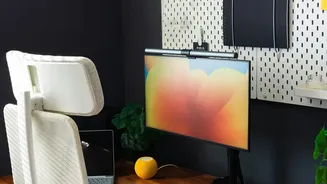
The ergonomic solution is remarkably simple: raise your monitor. The goal is to position your screen so that your body can maintain a neutral, upright posture without conscious effort. The general rule of thumb is to place your monitor so the top of the screen is at or slightly below your eye level when you are sitting up straight. Your eyes should naturally look slightly downward to view the center of the screen. This alignment allows your head to stay balanced directly over your shoulders, keeping your neck straight and preventing the initial forward tilt that leads to slouching. With your neck and head in a neutral position, your spine can maintain its natural curves, significantly reducing the strain on both your upper and lower back.
How to Achieve the Right Height
Achieving the correct monitor height doesn't necessarily require expensive equipment. While adjustable monitor arms or stands are excellent for providing flexibility, you can easily create a solution with items you already have. A sturdy stack of books, reams of paper, or a simple shelf can work just as well to elevate your screen to the proper eye level. In addition to height, your monitor should be positioned about an arm's length away from you. This prevents you from leaning in or squinting, which can also compromise your posture. A slight backward tilt of the monitor (around 10-20 degrees) can also improve viewing comfort and help maintain a healthy posture.
A Holistic View of Workspace Wellness
While monitor elevation is a crucial step, it is most effective as part of a complete ergonomic setup. Pay attention to your chair, ensuring it provides good lumbar support and allows your feet to rest flat on the floor with your knees at a 90-degree angle. Your keyboard and mouse should be positioned to keep your elbows bent at roughly 90 degrees and your wrists straight. Finally, remember that even the most perfect setup can't replace the need for movement. Taking short breaks every 30 to 60 minutes to stand, stretch, and walk around is vital for improving circulation and relieving the pressure that builds from prolonged sitting.