




Why the Aadhaar-Mobile Link is a Game Changer
The single most significant factor in speeding up a PAN card reissue is the Aadhaar-based e-KYC (Know Your Customer) and e-Sign process. When your mobile number is linked to your Aadhaar, you can receive a One-Time Password (OTP) to instantly authenticate
your identity online. This completely eliminates the need to print forms, attach physical documents, and send them by post, which was the standard, slower procedure. The system uses your verified Aadhaar data—name, date of birth, address, and photograph—to populate and validate the application digitally, making it a truly paperless and expedited affair. If your mobile number isn't linked, you cannot use this OTP-based service and must opt for the slower, offline methods.
The Two Paths: Digital vs. Physical
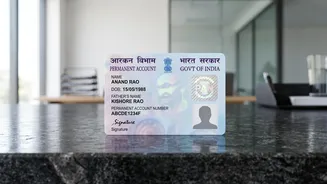
There are two main routes for a PAN card 'reprint,' which is the correct term when you need a duplicate card without any changes to your details. The traditional offline method involves downloading a form, filling it in, attaching physical copies of your identity and address proofs, and submitting it at a designated centre. This process can take between 15 to 25 working days for the card to be delivered. In stark contrast, the online Aadhaar-based e-KYC method is significantly faster. An e-PAN (a digitally signed, valid PDF version of your card) can be generated in as little as a few hours to two days. The physical card, if requested, is then dispatched and typically arrives within 7 to 15 working days.
Step-by-Step Guide for a Fast Reissue
You can request a reprint through either of the two government-authorised portals: Protean (formerly NSDL) or UTIITSL. You should use the portal of the agency that originally processed your PAN card. The steps are broadly similar for both: 1. Visit the official PAN service portal (Protean or UTIITSL) and select the option for 'Reprint of PAN Card' or 'Changes or Correction in existing PAN data'.2. Enter your PAN, Aadhaar number, and date of birth as required.3. Consent to Aadhaar authentication. You will be prompted to choose the option 'Submit digitally through e-KYC & e-Sign (paperless)'.4. An OTP will be sent to your Aadhaar-linked mobile number. Enter this OTP to verify your identity.5. Your details will be auto-populated from the Aadhaar database. Confirm that they are correct. Since this is a reprint, you are not changing any data.6. Proceed to the payment gateway to pay the nominal fee. The fee for a physical PAN card dispatched within India is currently ₹50.7. After successful payment, an acknowledgement slip is generated. You can use this to track the status of your application.
What You Need Before You Start
To ensure the process is seamless, have the following ready before you begin your application: Your 10-digit PAN number. Your 12-digit Aadhaar number. Your date of birth. The mobile number linked to your Aadhaar must be active and accessible to receive the OTP.* Access to an online payment method like a debit card, credit card, or net banking to pay the application fee.
Reprint vs. Correction: A Crucial Distinction
It is critical to understand that a 'reprint' request is only for obtaining a new copy of your existing card without any changes. If your name, date of birth, photograph, signature, or address needs to be updated, you must file a 'Change/Correction in PAN Data' application instead. Submitting the wrong type of request is a common error that leads to rejection or delays. The Aadhaar e-KYC process can also be used for corrections, where the updated details from your Aadhaar will be fetched to make the changes on your PAN.