




Why Clean Audio is Non-Negotiable
In the intimate world of podcasting, audio quality is king. Listeners are often consuming your content through headphones, creating a direct, personal connection with your voice. When that connection is interrupted by distracting background noise, low-volume
dialogue, or harsh echoes, it creates a jarring experience. More than just an annoyance, poor audio signals a lack of professionalism and can quickly lead to listener fatigue and abandonment. Before a listener can even judge your content, they judge your sound. In a saturated market, delivering a clean, crisp, and pleasant listening experience is the first and most crucial step to keeping an audience engaged and coming back for more.
The New Magic of AI Audio Tools
For years, cleaning up audio was a tedious, manual process requiring expensive software and technical expertise. Engineers would spend hours painstakingly applying noise gates, equalizers, and other filters to isolate and remove unwanted sounds. Today, artificial intelligence has revolutionized this workflow. Modern AI audio enhancement tools use machine learning models trained on thousands of hours of speech and noise. These tools can automatically identify the human voice and separate it from everything else—be it traffic, wind, air conditioning hum, or room reverb. What once took an expert hours can now often be accomplished with a single click, making professional-grade audio cleanup accessible to creators of all skill levels and budgets.
Top Open-Source & Free Tools to Try
The headline promise is "open-source," and the most powerful tool in that category is Audacity, a long-standing free audio editor. Its classic built-in 'Noise Reduction' effect is a great starting point. It uses a two-step process: you provide it with a sample of just the noise (the 'noise profile'), and then it subtracts that sound from your entire recording. For a more modern, AI-driven approach within Audacity, the OpenVINO plugin suite offers 'Noise Suppression' that can intelligently remove background sounds without needing a separate noise sample. Another truly open-source option for the more technically inclined is Resemble Enhance, which uses deep learning to denoise speech but may require some setup. These tools give you powerful capabilities without costing a single rupee.
Powerful Free Alternatives to Consider
While not strictly open-source, some free commercial tools are so effective that no budget-conscious podcaster should ignore them. The most talked-about is Adobe Podcast's 'Enhance Speech' feature. It's a free, browser-based tool that delivers genuinely stunning results, often making a phone recording in a noisy room sound like it was captured in a professional studio. Another excellent option with a generous free tier is Auphonic, a favourite for automated mastering that handles noise reduction, loudness normalization, and leveling between speakers. Podcastle also offers a strong free plan that includes their 'Magic Dust' noise removal feature alongside text-based editing. These services often work best for one-off file processing and are incredibly user-friendly.
Best Practices: Prevention is Better Than Cure
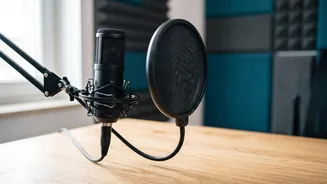
AI tools are powerful, but they work best when they have a decent recording to start with. An audio expert on Reddit notes that while AI reverb reduction is impressive, it can still introduce artifacts. You can save yourself significant post-production headaches by following simple recording hygiene. First, choose the quietest space available and record at a time with minimal ambient noise. Second, get close to your microphone; the closer you are, the more it will pick up your voice instead of room reflections. Third, use a pop filter to prevent harsh 'plosive' sounds from letters like 'P' and 'B'. Finally, do a quick test recording to check your levels and listen for any unexpected hums or buzzes. A few minutes of prevention before you hit record will always yield a better result than hours of cleanup afterward.