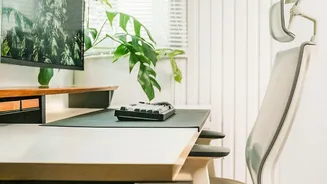




The Hidden Cost of a Bad Setup
When your workspace isn't designed to fit your body, you're forced into unnatural postures that can lead to a host of health issues. This isn't just about minor discomfort; poor ergonomics can contribute to chronic back pain, neck strain from improperly
placed monitors, and repetitive strain injuries (RSIs) like carpal tunnel syndrome from awkward keyboard angles. Over time, these conditions can cause muscle imbalances, joint stress, nerve compression, and even reduce mobility. Beyond the physical toll, constant pain and discomfort can increase stress and negatively impact your focus and productivity.
Your Chair: The First Fix
Your chair is the foundation of an ergonomic workspace. Start by adjusting its height so your feet rest flat on the floor with your thighs parallel to it; use a footrest if needed. The chair should have adequate lumbar support that fits the natural curve of your lower back. You can use a small cushion or a rolled-up towel for extra support if your chair lacks this feature. Your armrests should be positioned so that your elbows can bend at a comfortable 90-degree angle, allowing your shoulders to relax. This simple adjustment prevents hunching and reduces strain on your upper body.
Position Your Monitor and Keyboard Correctly
Staring down at a laptop or up at a monitor forces your neck into an unnatural position, leading to stiffness and headaches. Position your primary screen directly in front of you, about an arm's length away. The top of the screen should be at or slightly below eye level. If you use a laptop, connecting it to an external monitor or placing it on a stand or stack of books can help you achieve the correct height. Your keyboard and mouse should be on the same level, positioned low enough to keep your wrists straight and your forearms parallel to the floor.
Embrace the 90-90-90 Rule
A simple guideline for good posture is the 90-90-90 rule. Aim for a 90-degree angle at your elbows, hips, and knees. Your elbows should be bent at a right angle, close to your body. Your hips should also be at roughly a 90-degree angle, with your back supported by the chair. Finally, your knees should be bent at 90 degrees with your feet flat on the floor or a footrest. This posture helps maintain the natural alignment of your spine and reduces strain on your joints and muscles throughout the day.
Movement is Your Best Defence
Even the most perfect ergonomic setup can't negate the effects of sitting for hours on end. Reduced circulation and muscle fatigue are common consequences of a sedentary workday. Make it a habit to take short breaks to stand, stretch, and walk around for a few minutes every hour. To combat eye strain, follow the 20-20-20 rule: every 20 minutes, look at something 20 feet away for 20 seconds. Incorporate simple desk stretches, such as neck rotations, shoulder blade squeezes, and torso twists, to relieve tension and keep your muscles from getting stiff.