


Ink Tank vs. Cartridge
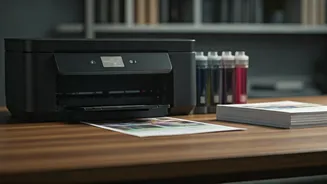
The printing world offers diverse solutions, but a primary divergence lies between ink tank systems and traditional ink cartridges. Ink tank printers,
often referred to as Continuous Ink Supply Systems (CISS), feature integrated reservoirs that hold larger volumes of ink. These are refilled from external bottles, leading to significantly lower per-page printing costs and extended periods between refills. This makes them exceptionally cost-effective for high-volume printing, often favored by students, small businesses, or anyone who prints frequently. On the other hand, printers using ink cartridges rely on smaller, pre-filled units that need to be replaced entirely once depleted. While the initial cost of a cartridge printer might be lower, the ongoing expense of purchasing replacement cartridges can accumulate rapidly, especially for color printing. Cartridge-based systems are generally simpler for infrequent users who may not require large ink capacities, offering a straightforward replacement process, but at a higher long-term operational cost.
Laser vs. Inkjet Technology
When selecting a printer, understanding the underlying technology is crucial. Inkjet printers function by spraying tiny droplets of liquid ink onto paper, building up images line by line. This method excels at producing vibrant, high-quality color prints, making them ideal for photographs, marketing materials, and general document printing where color accuracy is paramount. However, inkjet cartridges can dry out if not used regularly, and the cost per page can be higher. Laser printers, conversely, use a dry toner powder and a laser beam to create an image on a drum, which is then transferred to the paper and fused with heat. They are renowned for their speed and crisp text output, making them a superior choice for high-volume text-based documents, reports, and professional correspondence. Laser printers generally have a lower cost per page for monochrome printing and their toner cartridges have a longer shelf life, as the toner powder does not dry out. While color laser printers are available, they are typically more expensive than their inkjet counterparts and may not match the photographic quality of high-end inkjets.
Key Comparison Factors
To effectively compare printers, several key specifications should be examined. Print speed, often measured in pages per minute (ppm), is a critical factor for productivity. Look for separate speed ratings for monochrome and color printing, as they can vary significantly. Resolution, measured in dots per inch (dpi), dictates the level of detail and sharpness in prints; higher DPI generally means better quality, especially for images. Connectivity options are also vital: consider whether you need USB, Wi-Fi, Ethernet, or mobile printing capabilities like AirPrint or Google Cloud Print. Features like automatic document feeders (ADF) for scanning multiple pages, automatic duplex printing (two-sided printing), and the type of paper handling (e.g., maximum paper capacity, support for different paper sizes and types) can greatly enhance user experience and workflow efficiency. Finally, consider the total cost of ownership, which includes the printer's purchase price, the cost of replacement ink or toner, and the estimated lifespan of the device.
Multifunction Capabilities
Many modern printers go beyond simply printing, offering integrated multifunctionality that can streamline your workspace. All-in-One (AiO) or Multi-Function Printers (MFPs) typically combine printing, scanning, copying, and sometimes even faxing capabilities into a single device. This consolidation saves space and can be more cost-effective than purchasing individual devices for each function. When evaluating MFPs, pay attention to the quality and features of each component. For instance, scanner resolution (often measured in optical DPI) determines the clarity of scanned documents and images, while the ADF's capacity and speed are important for efficient multi-page scanning. Copier functions usually mirror the printer's printing speed and quality, and fax capabilities, while less common now, might be a necessity for some businesses. Choosing an MFP that aligns with your primary use case – whether it's heavy scanning, frequent copying, or high-quality printing – is essential for maximizing the device's utility.