







Charger Basics Explained
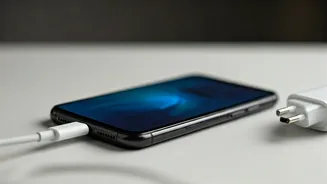
The primary function of a charger is to supply power to a smartphone, enabling the battery to recharge. Chargers have become increasingly sophisticated,
incorporating different technologies and specifications. Voltage, measured in volts (V), is the electrical potential difference that drives current flow, while amperage, measured in amperes (A), quantifies the rate of electrical current flow. The power output, measured in watts (W), is derived by multiplying the voltage by the amperage (W = V x A). Understanding these three variables is fundamental in selecting a suitable charger. Modern smartphones often support faster charging, which can be accomplished by increasing either the voltage or the amperage, or sometimes both. However, it's essential to ensure that the charger is compatible with the smartphone's specifications to avoid potential damage or performance issues. The charger's build quality, certifications, and safety features are all significant components, emphasizing the need to approach this area with a discerning perspective.
Wattage And Charging Speed
Wattage plays a significant role in determining how quickly a smartphone charges. A charger's wattage indicates the rate at which it delivers power to the device. Chargers with higher wattage can charge a smartphone faster, but only if the device itself supports fast charging. A smartphone's charging speed also depends on various factors, including the battery's capacity, the charging algorithm used by the manufacturer, and the temperature of the device. Fast charging technologies, such as those developed by Qualcomm (Quick Charge) and other manufacturers, employ intelligent charging protocols to optimize charging speeds without compromising the battery's health. It is essential to choose a charger with a wattage compatible with the smartphone's charging capabilities. Using a charger with a lower wattage than the device supports will result in slower charging times, whereas using a charger with a significantly higher wattage may cause the device to charge at its maximum supported speed but could generate excess heat. This can potentially affect long-term battery health.
Types Of Smartphone Chargers
Several types of smartphone chargers are available, each with unique features and applications. The most common type is the standard wall charger, which plugs into an electrical outlet and connects to the smartphone via a USB cable. These chargers come in varying wattages, allowing for standard or fast charging. Portable chargers, also called power banks, are battery-powered devices that can charge smartphones on the go. They come in different capacities, measured in milliampere-hours (mAh), providing varying levels of charging capability. Wireless chargers utilize the Qi standard, allowing smartphones to charge wirelessly by placing them on a charging pad. Wireless charging offers convenience but is typically slower than wired charging. Car chargers plug into a car's cigarette lighter or power outlet and provide a convenient way to charge smartphones while driving. They often feature multiple USB ports to charge multiple devices simultaneously. The choice of charger depends on the user's needs, lifestyle, and the types of features they prioritize, considering factors like portability, charging speed, and ease of use.
Impact On Battery Health
The charger has a direct impact on the smartphone's battery health. The type of charger and how it is used can affect the battery's lifespan and performance over time. Using a charger that delivers the correct voltage and amperage, as specified by the smartphone manufacturer, is crucial to prevent damage to the battery. Excessive heat, generated by the charger or the charging process, can degrade the battery's capacity and overall health. It is advisable to avoid charging a smartphone in high-temperature environments, such as direct sunlight or a hot car. Charging a smartphone overnight is generally safe, as most modern smartphones have built-in mechanisms to prevent overcharging. However, prolonged charging at 100% capacity may slightly reduce the battery's lifespan. Regularly using fast charging can also affect battery health over time, as it can generate more heat. It's often recommended to use fast charging when needed and to switch to standard charging for daily use to extend battery life. These practices, coupled with using quality chargers, help ensure the battery's health and enhance the overall user experience.
Charger Safety Features
Safety features are crucial when selecting a smartphone charger, as they protect both the device and the user. Look for chargers with built-in protection mechanisms to prevent overcharging, over-voltage, and short-circuiting. Overcharge protection prevents the battery from getting damaged by charging beyond its capacity, ensuring safe operation. Over-voltage protection prevents the charger from delivering excessive voltage, protecting the smartphone's internal components. Short-circuit protection prevents damage by shutting down the charger if a short circuit is detected. Chargers certified by recognized organizations, like UL or CE, have undergone testing to meet safety standards. They are designed to operate safely under normal conditions. Always use chargers from reputable brands that prioritize safety and quality. Low-quality chargers may lack these essential safety features, which could pose risks to both the smartphone and the user. Regularly inspect the charger for any signs of damage, such as frayed cables or cracked housings, and replace it if necessary. By considering safety features, users can significantly reduce the risks associated with charging their smartphones.
Best Practices To Follow
Following some best practices will optimize the charging experience and prolong the smartphone's battery life. Always use the charger and cable that came with the smartphone, or a charger and cable that are certified as compatible. These are designed to work together, delivering the appropriate power and ensuring safe charging. Avoid exposing the charger or the smartphone to extreme temperatures, which can damage the battery. Keep the charger and the charging port on the smartphone clean and free of debris to prevent charging issues. Avoid using the smartphone while it is charging, especially when using a fast charger, as this can generate additional heat. Consider charging the smartphone when the battery level is between 20% and 80% rather than charging it to 100% every time. This can help to extend the battery's lifespan. Regularly calibrate the battery by allowing it to discharge fully and then charging it to 100% periodically. This helps to maintain the accuracy of the battery level indicator. By adopting these best practices, users can improve the overall charging experience and maintain their device's battery health.