







Start With Your Chair, Not Your Desk
The foundation of an ergonomic workspace is a properly adjusted chair. Many people make the mistake of adjusting their desk first, but your chair dictates your entire posture. Start by adjusting the height so your feet rest flat on the floor with your thighs
parallel to the ground. Your knees should be at or slightly below your hips. Sit back fully so your lower back is pressed against the chair’s lumbar support; if your chair lacks good support, a rolled-up towel or small cushion can provide the necessary arch. There should be a small gap, about three fingers wide, between the front edge of the seat and the back of your knees to ensure good circulation.
Position Your Monitor to Protect Your Neck
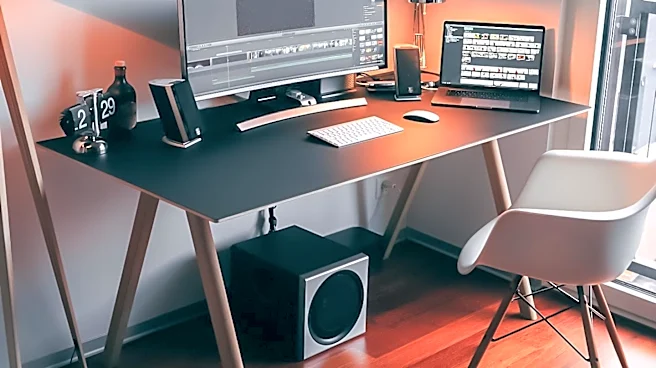
One of the most common ergonomic mistakes is incorrect monitor placement, which forces your neck into awkward angles. Your monitor should be positioned directly in front of you, about an arm's length away. The top of the screen should be at or just below your eye level, allowing you to look slightly downward at the center of the screen without tilting your head. This simple fix prevents you from craning your neck up or hunching forward, which are major causes of neck strain and tension headaches. If you wear bifocals, you may need to lower your monitor an extra inch or two for comfortable viewing.
Align Your Keyboard and Mouse
Your keyboard and mouse placement directly impacts your shoulders, arms, and wrists. Once your chair is set, your keyboard should be positioned at a height that allows your elbows to bend at roughly a 90-degree angle, with your forearms parallel to the floor. This keeps your shoulders relaxed and prevents hunching. Your wrists should remain as straight as possible while typing to avoid strain. The mouse should be placed close to the keyboard on the same level, so you can reach it without straining your shoulder or bending your wrist unnaturally.
The Laptop Problem (and Its Solution)
Laptops are notoriously poor from an ergonomic standpoint because their attached screen and keyboard force a compromise. If the keyboard is in a good position, the screen is too low, and if the screen is at eye level, the keyboard is too high. Working for long periods on a laptop often leads to hunching over and significant neck strain. The best solution is to treat your laptop like a desktop computer. Place it on a stand or a stack of books to raise the screen to eye level, and use a separate, external keyboard and mouse. This allows you to position each component correctly, just as you would with a full desktop setup.
Remember to Move
Even the most perfectly ergonomic setup cannot undo the negative effects of remaining static for too long. Prolonged sitting reduces circulation and puts stress on your muscles and joints. Physical therapists recommend taking short “micro-breaks” every 30 to 60 minutes. You don’t need to do much; simply standing up, walking around for a minute, or doing a few simple stretches at your desk can alleviate tension and improve blood flow. Set a timer to remind yourself to get up regularly. Movement is a crucial, and often overlooked, component of a healthy workday.