








Start with Your Foundation: The Chair
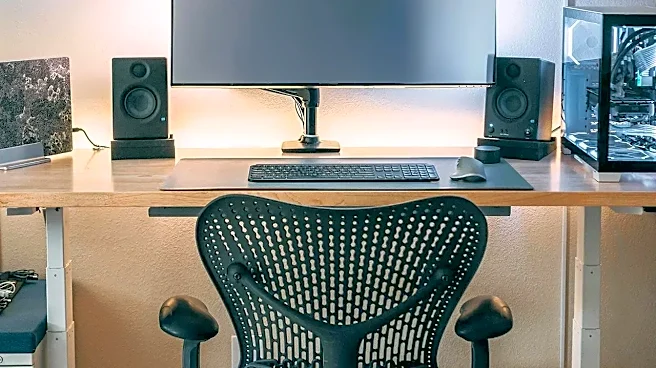
Your chair is the cornerstone of your ergonomic setup. Begin by adjusting the height so your feet rest flat on the floor with your thighs parallel to the ground. There should be a small gap, about two to three fingers wide, between the front edge of the seat
and the back of your knees. The backrest should be adjusted to support the natural curve of your lower back. If your chair lacks built-in lumbar support, a small pillow or a rolled-up towel can work wonders. Finally, position your armrests so your shoulders are relaxed and your elbows are close to your body. Think of them as a place to rest your arms between tasks, not while actively typing.
Position Your Desk and Keyboard
Once your chair is set, turn your attention to your desk surface. Your keyboard and mouse should be at a height that allows your elbows to bend at a roughly 90-degree angle while you type. Your wrists should be in a straight, neutral position, not bent up or down. If your desk is too high, raise your chair and use a footrest to keep your feet flat. If it's too low, you can place sturdy blocks under the desk legs to elevate it. Keep the keyboard and mouse close to you to avoid reaching, which puts a strain on your shoulders and back. The goal is to let your arms hang relaxed from your shoulders.
Set Your Screen at Eye Level
To prevent neck strain, your monitor placement is critical. Position the monitor directly in front of you, about an arm's length away. The top of the screen should be at or just slightly below your eye level. This allows you to look straight ahead without tilting your head up or down. If you use two monitors, place the primary one directly in front of you and the secondary one to the side. If you use both equally, angle them together in a slight V-shape so you only have to turn your head slightly to view either one. Tilting the monitor back 10-20 degrees can also help reduce glare and improve your viewing angle.
Arrange Your Essential Tools
Beyond the big three (chair, desk, monitor), your peripherals matter. An ergonomic mouse and keyboard are designed to reduce strain on your wrists and hands. Regardless of the model, they should be placed on the same level and close enough that you aren't reaching. Keep frequently used items like your phone, a notepad, or a drink within easy arm's reach to minimize twisting and stretching. If you reference documents frequently, a document holder placed next to your monitor can prevent you from repeatedly looking down and up, which strains your neck muscles. The key is to minimize any awkward postures throughout your day.
Incorporate Movement and Breaks
Even the perfect ergonomic setup can't compensate for a static posture held for hours. The human body is designed to move. Make it a point to change your posture every 30 minutes. If you have a sit-stand desk, alternate between sitting and standing throughout the day. Set a timer to remind yourself to get up, stretch, walk around, or just look away from your screen. A popular technique is the 20-20-20 rule: every 20 minutes, take a 20-second break to look at something 20 feet away. This simple practice helps combat digital eye strain and gives your focusing muscles a much-needed rest.