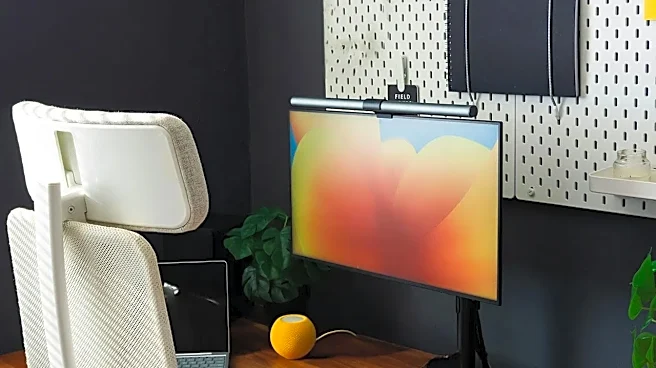







Your Monitor is Too Low (or Too High)
One of the most frequent culprits of neck and shoulder pain is improper monitor placement. If you're constantly looking down, even slightly, you're forcing the muscles in your neck and back to work overtime to hold your head up. This leads to strain and tension
headaches. The fix is simple: position your monitor so the top of the screen is at or just below your eye level. Your screen should also be about an arm's length away. If you use a laptop, this mistake is almost guaranteed unless you use a separate monitor or a laptop stand to elevate the screen. For those who wear bifocals, lowering the monitor an extra inch or two can provide a more comfortable viewing angle.
Your Chair Height is Wrong
Your chair is the foundation of your ergonomic setup, and the wrong height throws everything else off. If your chair is too high, you might find pressure on the back of your thighs. If it's too low, your knees will be higher than your hips, stressing your lower back. The goal is to have your feet resting flat on the floor with your knees at roughly a 90-degree angle and your thighs parallel to the floor. If your desk is too high to achieve this, raise your chair and use a footrest to provide a stable base. Proper height helps evenly distribute your weight and sets the stage for good posture.
Your Keyboard and Mouse Are an Afterthought
Reaching for your keyboard or mouse can cause significant strain on your wrists, arms, and shoulders. Your keyboard and mouse should be positioned at a height that allows your elbows to be bent at approximately a 90-degree angle, with your forearms parallel to the floor. Your wrists should be straight, not bent up or down. Keep the keyboard and mouse close to the front of the desk so you aren't stretching to reach them, and place the mouse right next to the keyboard to avoid awkward shoulder movements. If you primarily use the letter keys, the 'H' key should be roughly aligned with the middle of your body.
You're Not Using Your Backrest
Many people have the habit of perching on the edge of their chair, especially when focused or stressed. This completely negates the benefit of an ergonomic chair, forcing your back muscles to do all the work. To fix this, sit so your back is fully against the backrest. Adjust the lumbar support so it fits into the natural curve of your lower back. The back of the chair should be tilted to a slightly reclined angle of around 100 to 110 degrees, which is more supportive than sitting perfectly upright.
Your Feet Aren't on the Floor
Dangling feet or legs wrapped around the base of your chair can compromise your stability and posture. Having both feet firmly planted on the floor (or a footrest) is crucial for keeping your pelvis balanced and making it easier to maintain the natural curve in your lower back. If your feet can't comfortably reach the floor when your chair is at the proper height for your desk, it's a clear sign you need a footrest. This small addition can make a huge difference in lower body comfort and overall spinal alignment.
You Sit Still for Too Long
Even the most perfect ergonomic setup has a flaw: it can't protect you from the negative effects of being static. Sitting in one position for extended periods leads to muscle fatigue, stiffness, and reduced circulation. Your body is designed to move. Set a reminder to get up, stretch, or walk for a minute or two every 30 to 45 minutes. These small movement breaks wake up your muscles, improve blood flow, and give your body a much-needed reset, making you more comfortable and productive in the long run.