










More Than an Upside-Down Mouse
Let’s get one thing straight: a trackball is not an upside-down mouse. In fact, it’s the other way around. The trackball predates the mouse, with origins in top-secret military radar systems from the post-WWII era. While the mouse required you to move
your whole arm across a desk, the trackball was stationary. You moved the cursor by rolling a ball with your fingers or thumb. This fundamental difference offered two immediate advantages: it saved precious desk space and allowed for a level of fine motor control that moving a whole device couldn't match. Its initial appeal wasn’t to the masses but to a very specific and demanding user: the professional.
The Professional’s Secret Weapon
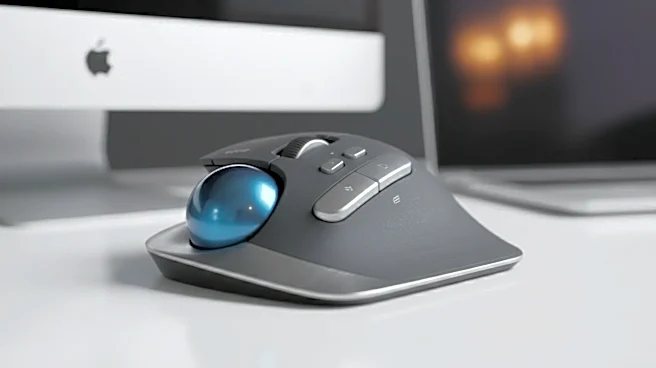
In the 1980s and 90s, as personal computing boomed, the trackball found its footing not in every home, but in every serious design studio, engineering firm, and recording booth. Companies like Kensington and Logitech built their reputations on these devices. Professionals doing computer-aided design (CAD), graphic design, and audio editing needed pixel-perfect precision for hours on end. A traditional mouse could be clumsy for this work, requiring constant lifting and repositioning. A trackball, especially one with a large, heavy ball, offered superior control and less physical strain. This professional niche, often populated by small businesses and independent contractors, became an unintentional incubator for hardware innovation. They valued function over form and were willing to pay a premium for tools that were durable, efficient, and comfortable.
The Birth of Customization and Comfort
The focus on professional users led directly to two major shifts in hardware design: ergonomics and customization. With people spending all day on a computer, concerns about repetitive strain injury (RSI) began to grow. Trackball makers responded with sculpted, ergonomic shapes that cradled the hand, reducing muscle strain in the wrist and forearm. Logitech’s Ergo series and Kensington’s Expert Mouse became benchmarks in comfort, with some models offering adjustable angles to promote a more natural handshake-like posture. More importantly, these devices pioneered programmable buttons. Instead of just a left and right click, trackballs began sporting four, six, or even eight buttons that users could assign to specific shortcuts or macros. A designer could program a button to open a tool palette; an audio engineer could assign one to cut a track. This idea of a device adapting to the user’s workflow, not the way around, was revolutionary.
The Ripple Effect into Mainstream Tech
For years, these features were considered high-end extras for specialists. Mainstream consumers got cheap, symmetrical, two-button mice. But then, something happened: the gaming industry exploded. Gamers, another demanding niche, wanted the same things professionals did: precision, comfort for long sessions, and, crucially, programmable buttons for complex in-game commands. Suddenly, the innovations honed in the small business world had a massive new market. The DNA of the pro-grade trackball began to appear everywhere. Ergonomic mice with sculpted grips became standard office equipment. High-end gaming mice boast adjustable sensitivity, multiple side buttons, and custom software profiles—all concepts that were tested and proven in the trackball arena. The idea that your hardware should be comfortable and configurable is now a core expectation for everything from mice to keyboards and game controllers.