







The One-Button Command Center
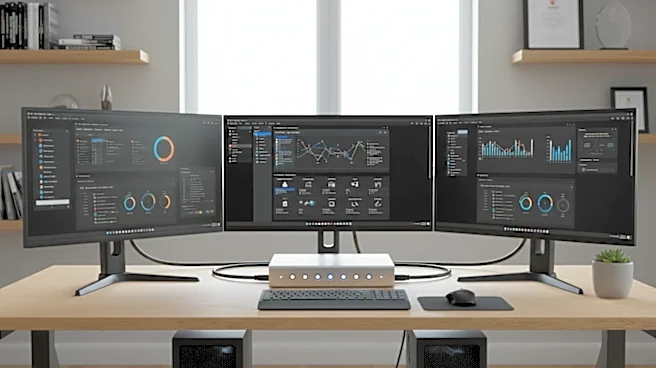
Let’s cut through the jargon. A KVM switch is a small hardware device that lets you control multiple computers using a single Keyboard, Video monitor, and Mouse. Think of it as a universal remote for your entire computer setup. Instead of having a separate
monitor, keyboard, and mouse for your work laptop and your personal desktop, you plug them all into the KVM. With the press of a button, you can instantly toggle which machine you’re controlling, without ever swapping a cable. It’s a simple concept that has profound effects on how you work and play.
The Hidden Cost Savings
The most overlooked benefit of a KVM switch is economic. Many users balk at the price of a quality KVM, which can range from under $50 for a basic model to several hundred for advanced versions with high refresh rate support. But they fail to consider the alternative cost: duplicating your entire peripheral setup. A high-quality ergonomic keyboard, a precision gaming mouse, and a large, color-accurate 4K monitor are significant investments. A KVM switch allows you to buy one excellent set of peripherals and share it across all your devices, rather than settling for two or three mediocre setups. Over time, this not only saves money but also ensures you're always using the best tools for the job, whether you’re working or gaming.
More Than Just a Tidy Desk
Sure, the most immediate reward of a KVM is decluttering your workspace. Fewer peripherals mean more physical desk space, which is a welcome change for anyone tired of a chaotic setup. But the impact is more than just aesthetic. A streamlined desk creates a more focused mental environment. The daily hassle of unplugging and replugging cables, or shuffling between different keyboards, introduces small but constant interruptions that drain mental energy and break your flow state. A KVM switch eliminates that friction entirely, allowing for seamless transitions that keep you locked into your work.
The Unsung Workflow Superpower
This is where a KVM switch transitions from a convenience to a necessity. For many professionals, switching between systems is a core part of their daily workflow. A developer might need to test code on both a Windows PC and a Mac. A streamer often uses one powerful PC for gaming and a second for encoding the broadcast to ensure smooth performance. A remote worker must constantly jump between a secure company laptop and their personal computer. In each of these scenarios, a KVM switch provides instant, reliable switching, preserving productivity that would otherwise be lost to technical logistics. Many modern switches also share USB ports, letting you use a single webcam, microphone, or external drive across both systems without a fuss.
Is a KVM Switch for You?
While historically seen as a tool for IT admins in data centers, the KVM switch is now a mainstream device for a wide range of users. You are a prime candidate if you: regularly use both a work-provided laptop and a personal desktop; are a gamer who also streams, creates content, or works from the same desk; are a developer, designer, or creator who relies on multiple operating systems; or simply want to maximize your investment in high-quality peripherals by using them on every computer you own. Some modern monitors even come with KVM functionality built-in, further simplifying the setup by integrating the switch directly into the display.