








CBSE Class 10 Result 2026: The Central Board of Secondary Education announced the CBSE 10th grade results for 2026 today, April 15, 2026. The results link has been active at cbse.gov.in.
Digilocker and UMANG allow students to view and download their marksheets. The CBSE 10th 2026 exam ran from February 17 to March 11.
CBSE Class 10 Result 2026: Website to check the result
Students can use any of the following websites to view their results:
CBSE.gov.in
Results.nic.in
results.digilocker.gov.in
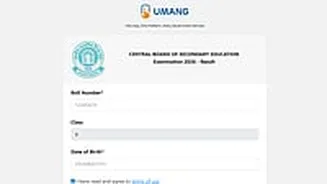
Umang.gov.in
Students should be aware, though, that even though they can view their results online, they will still need to pick up their mark sheets from their schools.
CBSE Class 10 Result 2026: Steps to check the result via SMS
You must send the following in order to check results via SMS:
Format: CBSE10, School Number, Center Number, Roll Number, DOB
Text: 7738299899
CBSE Class 10 Result 2026: Steps to check the result online
To download your result, simply follow these steps:
Step 1: Visit to the results.cbse.nic.in or cbse.gov.in.
Step 2: Click on the "CBSE Class 10 Result 2026" link.
Step 3: Enter your date of birth, school number, roll number, and admission card ID.
Step 4: To view your results, click the submit button.
Step 5: After printing the document, save it for later use.
CBSE Class 10 Result 2026: Steps to check the result via Digilocker
Use the DigiLocker app or website to access digital mark sheets by following these steps:
Step 1: Visit digilocker.gov.in or the app portal.
Step 2: Enter your phone number or Aadhar to log in.
Step 3: Select the "Issued Documents" tab.
Step 4: From the list, choose the CBSE board.
Step 5: Select the "Class 10 Mark Sheet 2026" URL.
Step 6: After downloading the mark sheet, complete the required fields.
CBSE Class 10 Result 2026: Steps to check the result via UMANG app
Step 1: Installing the UMANG application.
Step 2: Register or log in using your mobile number.
Step 3: Look up CBSE using the search bar or by going to the Education category.
Step 4: Choose the CBSE board option.
Step 5: Select the Class 10 Result URL.
Step 6: Enter the required login information.
Step 7: Download and view your results.
Students in Class 10 will only receive their passing certificates following the second board exam, according to the Central Board of Secondary Education. Rather, the marksheet alone will be distributed through DigiLocker at first.