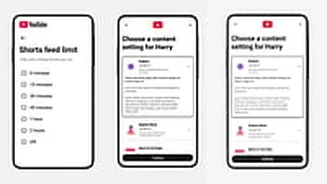









Monitoring YouTube access is one of the biggest pain points for parents all over. To ease that stress, YouTube has now introduced enhanced parental controls, which allow limiting or completing turning
off Shorts, a reel-like feature in the YouTube feed. This, along with other super useful features are now rolling out, giving more controls to parents - especially to kids aged above 9 years.
These new features aim to help parents manage screen time more effectively. These features are tailored especially for pre-teen and teenagers, who do not watch animated videos anymore, and are more susceptible to be exposed to explicit content on YouTube.
YouTube latest update: Key Features
1. Limits to YouTube Shorts: Parents can now set a timer for how long their child spends on Shorts each day. Options range from zero minutes to two hours. Setting the limit to zero blocks access to Shorts entirely.
2. Custom Reminders: The platform also enables custom reminders for bedtime and breaks. These build on existing default settings for users under 18. Bedtime reminders prompt users to stop watching at a set time. Break reminders encourage pauses after prolonged viewing.
3. Blocking of content: YouTube described the zero-limit option as an industry first for short-form content. A spokesperson noted it allows parents to block Shorts during homework or permit limited access during travel.
Eligibility and rollout details
The controls apply to supervised accounts only. These are designed for children and teens under 18. Parents must link their account to oversee their child's activity.
The features have begun rolling out, and should be accessible to all in the coming days. Further improvements, such as easier account switching in the app, will follow in the coming weeks. YouTube plans to update content guidelines to prioritise videos on wellbeing and life skills.
How to enable the new YouTube controls
First, ensure your child's account is supervised. Open the YouTube app on a mobile device. Sign in with your parent account. Go to Settings and select Family Centre. Choose to create or link a supervised account for your child.
To limit Shorts, navigate to the supervised account settings. Select Content Settings. Find the Shorts feed limit option. Adjust the daily timer as needed, from zero to 120 minutes.
For bedtime reminders, go to Wellbeing tools in settings. Enable Bedtime mode. Set the start and end times for restrictions.
To activate break reminders, access the same Wellbeing tools section. Turn on Take a Break. Choose intervals like every 15 or 30 minutes for prompts.