






Seasonal Serenity First
Immerse yourself in nature's rhythm by embracing seasonal themes for your laptop background. Consider the vibrant hues of spring, the sun-kissed warmth
of summer, the cozy foliage of autumn, or the serene tranquility of winter. Aligning your wallpaper with the current season can evoke a sense of connection to the outside world, subtly influencing your mood and overall work experience. Imagine a crisp, snowy scene gracing your desktop during the heart of winter, or a blooming meadow bringing a touch of freshness during spring. This simple yet effective approach provides a continuous, natural refresh.
Calming Scene Selection
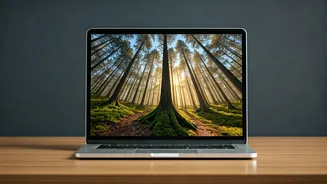
Prioritize selecting calming nature scenes for your office laptop's wallpaper to minimize stress and maximize focus. Opt for landscapes that resonate with tranquility – think serene forests, gentle waterfalls, expansive beaches, or tranquil lakes. Avoid overly busy or visually jarring images. The goal is to create a digital environment that promotes relaxation and concentration. Consider the psychological effects of color; cool tones like blues and greens can have a soothing impact, while warmer tones like yellows and oranges can evoke feelings of energy and optimism. Experiment to find what best suits your individual needs and preferences, creating a workspace that is both visually appealing and conducive to productivity.
Personal Style Alignment
To foster a sense of personal connection, align your nature wallpaper with your individual preferences. Consider your favorite environments – do you gravitate towards mountain vistas, coastal scenes, or dense jungles? Your chosen background is a form of self-expression; it should reflect your personality and resonate with your aesthetic sensibilities. Think about the mood you wish to cultivate. Do you want a sense of adventure, peaceful contemplation, or creative inspiration? The wallpaper's style and subject should contribute positively to the atmosphere you seek. Experiment with different styles, from photorealistic depictions to artistic interpretations, to achieve a cohesive, personalized visual experience that truly reflects your individual taste and enhances your everyday workspace.
Regular Wallpaper Rotation
To maintain visual interest and prevent screen fatigue, establish a routine of rotating your nature wallpapers. Regularly switching out your background keeps your workspace from becoming stale and helps prevent your eyes from growing accustomed to a single image. A change of scenery, even a digital one, can offer a refreshing perspective and stimulate your senses. You can set up automatic wallpaper rotation using your operating system's settings, choosing a cycle that fits your needs – daily, weekly, or monthly. Embrace this as an opportunity to discover new scenes and explore different themes. The constant shift of imagery can make your digital workspace feel more dynamic, inspiring fresh perspectives on your work and enhancing your overall experience.
High-Resolution Images Essential
The quality of your nature wallpapers significantly influences their visual appeal. Always prioritize high-resolution images to ensure a crisp, clear display on your office laptop's screen. Low-resolution images can appear pixelated or blurred, diminishing the impact and visual pleasure of the wallpaper. High-resolution images not only look better but also contribute to a more professional and visually engaging workspace. When selecting your images, ensure they are compatible with your laptop's screen resolution. Most online resources offer images with multiple resolution options, allowing you to choose the best fit for your device. Opt for images that are large enough to maintain clarity, even when filling the entire screen, ensuring your digital environment is as visually appealing as possible.